DoorDash On-Time Rate can be confusing because Dashers see several different times during a delivery.
You may see:
- A pickup time
- A delivery time
- A time that changes after you pick up the order
- An On-Time Rate inside the Ratings tab
- A completely separate Contract Violation for extreme lateness
Those things are related, but they are not all calculated the same way.
DoorDash has also updated its On-Time Rate system. The newer rating measures whether you complete eligible offers within the original expected delivery time shown when you accepted the offer, using your last 100 completed eligible offers. DoorDash says the expected time considers factors such as store wait time, driving distance, traffic and speed limits.
The most important thing to understand is this:
Your On-Time Rate is not permission to speed.
DoorDash says its delivery-time estimates are designed around safe travel, and its deactivation policy specifically identifies unsafe driving, including distracted driving, as conduct that can lead to account consequences.
This guide explains how DoorDash On-Time Rate works in 2026, why an order may show late even after the delivery time changes, which deliveries are excluded, how disputes work, how lateness contract violations differ and what you can realistically do to improve your score.
What Is DoorDash On-Time Rate?
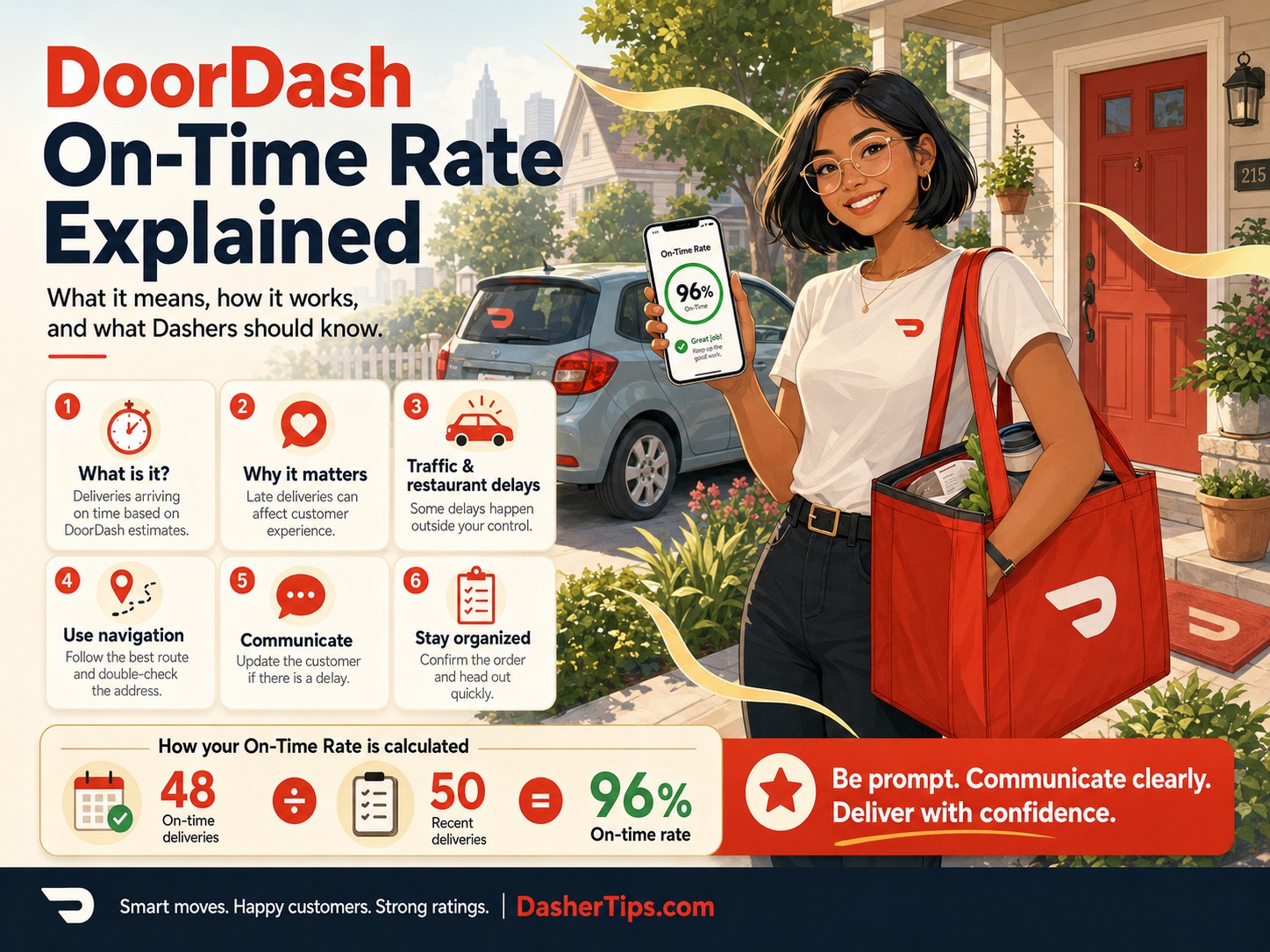
DoorDash On-Time Rate measures how often you complete eligible offers within the expected delivery time originally displayed when you accepted them. It is calculated using your last 100 completed eligible offers.
For example, suppose your most recent 100 eligible completed offers include:
- 94 completed on time
- 6 completed late
Your On-Time Rate would be:
94%
If you completed:
- 97 on time
- 3 late
your rate would be:
97%
The newer system replaces the older On-Time/Early rating with what DoorDash describes as a more responsive and transparent On-Time Rate.
How Does DoorDash Decide Whether an Order Is On Time?
The key number is the expected delivery time shown when you originally accept the offer.
DoorDash says this original time considers:
- Expected restaurant wait time
- Driving distance
- Traffic
- Speed limits
- Other delivery data
The estimate is intended to give a Dasher enough time to complete the delivery safely.
Suppose you receive an offer at 6:00 p.m.
The offer screen indicates an expected delivery time of:
6:35 p.m.
You accept.
You ultimately complete the delivery at:
6:32 p.m.
That would generally count as on time.
If you complete it at:
6:38 p.m.
it can be counted as late for the On-Time Rate because it was completed after the original expected delivery time.
Why Does the Delivery Time Change After Pickup?
This is one of the most confusing parts of the system.
During the delivery, DoorDash may update the time displayed in the app after you pick up the order.
For example:
When you accepted
Expected delivery:
7:15 p.m.
Restaurant is delayed
You wait 15 minutes.
After pickup
The app may now display:
7:30 p.m.
You might assume that 7:30 p.m. is now the time used for your On-Time Rate.
DoorDash says that is not how the rating works.
The delivery time shown during an active order may be updated to reflect the estimated time for the next part of the trip, but your On-Time Rate remains tied to the original delivery time shown when you accepted the offer.
That distinction explains why a delivery can occasionally look on time according to the current screen but still appear differently in the Ratings section.
Does Restaurant Wait Time Count Against On-Time Rate?
DoorDash says the original expected delivery time takes expected store wait time into account. It also says some late deliveries can be excused when the delay was outside your control. If an eligible prior delivery has been excused, the exclusion should appear in that delivery’s On-Time Rate details.
This means you should accurately report merchant delays when the app gives you the option.
For example, if you arrive and the restaurant says:
The order won’t be ready for another 20 minutes.
Use the appropriate in-app reason, such as an order still being prepared, when available.
Do not falsely mark the order picked up.
Do not leave the restaurant and drive around for 20 minutes.
And do not speed afterward trying to recover all of the lost time.
For separate lateness contract violations, DoorDash explicitly says merchant wait time is not counted against the Dasher because that system focuses on travel time.
That is another reason it is important not to confuse the On-Time Rate with extreme-lateness violations.
On-Time Rate vs. Lateness Contract Violation
These are two different systems.
On-Time Rate
Your On-Time Rate is a performance rating based on eligible recent deliveries.
DoorDash says it:
- Uses your last 100 completed eligible offers
- Compares completion with the original expected delivery time
- May affect Rewards qualification or other Dasher features depending on your location
- Allows some Dashers to dispute late deliveries directly in the app
Lateness Contract Violation
A lateness contract violation is more serious.
DoorDash says this system looks at whether the actual travel time to the merchant or customer significantly exceeded DoorDash’s estimated safe travel time, while accounting for circumstances such as merchant waits.
DoorDash uses mapping and real-time traffic information to estimate reasonable travel time and also considers your transportation type, such as car, bicycle or scooter.
The two systems should not be treated as interchangeable.
A delivery might slightly reduce your On-Time Rate without automatically becoming an extreme-lateness Contract Violation.
Does a Low On-Time Rate Automatically Get You Deactivated?
DoorDash’s lateness support page says the On-Time/Early rating itself is not used as the basis for lateness deactivations. Instead, repeated significant lateness can lead to Contract Violations and potentially deactivation.
At the same time, DoorDash’s newer Ratings page says the new On-Time Rate may affect Rewards qualification and other aspects of the Dasher experience depending on location.
So the practical distinction is:
Low On-Time Rate: may affect Rewards or other market-specific benefits.
Extreme or repeated lateness: can create Contract Violations and potentially put your platform access at risk.
How Late Is Too Late for a Contract Violation?
DoorDash does not frame the Contract Violation system simply as:
One minute late = violation.
Its official example explains that if estimated travel time is 20 minutes to the merchant and another 20 minutes to the customer, arrival at 5:30 p.m. instead of 5:20 p.m. and 5:50 p.m. instead of 5:40 p.m. would not be considered late under the contract-violation example.
DoorDash instead focuses on significantly exceeding estimated travel time.
The company also says merchant wait time, batching, DoorDash outages and certain extenuating circumstances are excluded from the lateness-violation process.
Do not turn the example into a rule that you always have exactly ten extra minutes. DoorDash evaluates travel conditions and estimates dynamically.
The safest strategy is simply to begin traveling toward the merchant and customer promptly.
How DoorDash Calculates On-Time Rate
The basic concept is:
On-time eligible completed offers ÷ last 100 eligible completed offers
Suppose your last 100 eligible offers contain:
- 91 on time
- 9 late
Your rate is:
91%
You complete your next delivery on time.
What happens?
It depends on the oldest eligible delivery leaving the rolling 100.
Scenario 1: An old on-time delivery drops off
A new on-time delivery replaces an old on-time delivery.
Your rate remains:
91%
Scenario 2: An old late delivery drops off
A new on-time delivery replaces the late delivery.
Your rating becomes:
92%
That is why your score may not increase after every successful delivery.
Why Isn’t My DoorDash On-Time Rate Going Up?
The rolling 100 system is usually the reason.
If your new on-time delivery replaces another on-time delivery, nothing changes.
Your score improves when newer on-time deliveries begin replacing older late deliveries.
So if your On-Time Rate is 89%, completing five deliveries on time does not necessarily mean you immediately reach 94%.
It depends on which older deliveries leave the calculation.
The best long-term strategy is consistent on-time completion.
Which Orders Count Toward DoorDash On-Time Rate?
Not every delivery type is included.
DoorDash currently says its On-Time Rate excludes:
- Shop & Deliver offers
- Parcel offers
- Successfully disputed offers
Batched orders are treated as one offer for On-Time Rate purposes.
This is important because your On-Time Rate may not exactly match what you would calculate by simply counting every order you completed during the last month.
Do Shop and Deliver Orders Affect On-Time Rate?
DoorDash says Shop & Deliver offers are not counted toward the newer On-Time Rate.
Shopping orders can be unpredictable because:
- Items are out of stock
- Customers take time to approve substitutions
- Checkout lines become long
- Store layouts vary
Excluding these offers prevents them from being treated exactly like a normal restaurant delivery for this particular rating.
Do Parcel Orders Count?
No. DoorDash currently says Parcel offers are excluded from the On-Time Rate calculation.
How Do Stacked Orders Affect On-Time Rate?
DoorDash says batched orders are treated as a single offer for purposes of the On-Time Rate.
This is useful to know because a two-customer stack does not necessarily create two separate On-Time Rate entries.
DoorDash also treats delays caused by batching differently in the Contract Violation system. Official lateness guidance says delays caused by batched orders are excluded from the lateness-violation process.
Still, follow the route DoorDash provides unless there is a legitimate reason to contact Support.
Can DoorDash Excuse a Late Delivery?
Yes.
DoorDash says it recognizes that a delivery can be late for reasons outside your control. When a prior delivery has been excused, you should be able to see that reflected in the delivery details inside the On-Time Rate experience.
Some Dashers also have the ability to dispute late deliveries directly through the app. DoorDash notes that this dispute feature is currently available only to certain Dashers.
If your app has the feature:
- Open Ratings.
- Tap On-Time Rate.
- Open the late delivery.
- Look for the dispute option.
- Provide accurate details.
Do not submit false information just to improve the score.
What If You Cannot Dispute a Delivery?
DoorDash says that if the dispute option is temporarily unavailable, completing additional deliveries may make you eligible to successfully dispute another delivery later. The feature is not currently available to every Dasher.
This means you should not expect every late delivery to have an immediate dispute button.
Why Is My Delivery Marked Late Even Though the Pickup Delay Was Excluded?
DoorDash addresses this situation directly.
If the pickup delay was excluded but you were also late during the drop-off portion, the delivery may still be classified as late because the drop-off delay was separate from the excused pickup issue.
For example:
Restaurant delay
20 minutes.
DoorDash excuses that portion.
After pickup
You stop for gas for 15 minutes.
Then continue to the customer.
The restaurant delay may be excused, but your additional post-pickup delay can still affect the delivery.
This is why it is important to separate:
merchant-caused delay
from
Dasher-controlled delay.
What Causes DoorDash Deliveries to Be Late?
Common causes include:
- Leaving for the restaurant too slowly
- Making personal stops after accepting
- Getting gas during an active delivery
- Unnecessary detours
- Poor multi-apping
- Waiting in the wrong pickup location
- Not checking the customer’s address early
- Missing apartment information
- Parking problems
- Traffic
- Road closures
- Merchant delays
- App or GPS problems
- Weather
- Customer access problems
- Vehicle trouble
Some of these are within your control.
Some are not.
Your goal is to eliminate the avoidable ones.
1. Start Driving Toward the Restaurant After Accepting
Once you accept an offer, begin working toward completing it.
Avoid accepting an order and then:
- Finishing a personal meal
- Shopping for yourself
- Talking with friends for 15 minutes
- Sitting at home
- Refueling unnecessarily
- Driving in the opposite direction
DoorDash’s Contract Violation guidance specifically looks at travel progress and estimated travel time, and DoorDash can flag behavior such as going offline after pickup or failing to make progress toward the customer.
If you are not ready to work, pause your dash before another offer arrives.
2. Do Not Accept Orders When You Need a Break
Suppose you need to use the restroom.
You receive a $15 order.
You accept because you do not want to miss it.
Then you spend 15 minutes inside a convenience store before driving to the restaurant.
That can create unnecessary lateness.
A better approach is:
- Pause the dash.
- Take your break.
- Resume when ready.
DoorDash itself recommends pausing when you need a break or declining an offer you cannot complete in a timely manner.
3. Get Gas Before a Busy Shift
Do not begin Friday dinner with an almost-empty tank.
A ten-minute gas stop after accepting an order is avoidable.
Develop a habit of checking:
- Fuel
- Battery
- Tire condition
- Phone charge
before the rush begins.
If you need gas between orders, pause the app.
4. Read Delivery Instructions Before Leaving the Restaurant
This is one of the easiest ways to save time.
While safely parked, look for:
- Apartment number
- Building number
- Gate code
- Hotel name
- Floor
- Parking instructions
- Business suite
- Customer notes
If information is missing, message the customer before leaving.
DoorDash recommends customer communication when unexpected delays or other delivery issues arise, and its guidance notes that keeping customers informed can help with the overall delivery experience.
Example
Instead of arriving at a gated community and discovering there is no code, send:
Hi! I’m waiting for your order now and noticed the delivery is inside a gated community. Could you please send the gate code if one is required? Thank you!
You may receive the answer before you arrive.
5. Learn Difficult Apartment Complexes
A delivery that takes five minutes to drive can take another 20 minutes to complete if you cannot find the building.
Pay attention to:
- Building layouts
- Numbering systems
- Guest entrances
- Parking areas
- Elevator locations
- Gate access
- Leasing-office locations
You will become much faster with experience.
You can also keep general notes about confusing complexes as long as you are not storing private customer information unnecessarily.
6. Use Navigation, but Verify the Address
Navigation apps are helpful but not perfect.
GPS may send you:
- Behind the building
- To an alley
- To a neighboring property
- To a locked gate
- To the wrong apartment entrance
Compare:
GPS destination
with
the written DoorDash address
before completing the delivery.
A wrong turn can add several unnecessary minutes.
7. Avoid Poor Multi-App Practices
Using DoorDash together with Uber Eats or another platform can reduce downtime.
But accepting conflicting deliveries can create serious lateness.
For example:
DoorDash customer
North of town.
Uber Eats customer
Ten miles south.
You accept both anyway.
Now one customer must wait while you travel in the wrong direction.
That can damage:
- On-Time Rate
- Customer Rating
- Food quality
- Account standing
DoorDash’s Contract Violation guidance says failing to make progress toward the customer, including driving in circles or traveling in the wrong direction, can be problematic.
A safer multi-app strategy is:
- Keep multiple apps available while waiting.
- Accept one suitable offer.
- Pause the others when necessary.
- Complete the delivery properly.
- Resume afterward.
8. Report Merchant Delays Correctly
When the restaurant is late, use the appropriate option in the Dasher app.
Possible reasons may include:
- Order still being prepared
- Store busy
- Order not started
- Drive-thru line
- Other merchant issue
Accurate reporting helps create a record of what actually happened.
For separate lateness Contract Violations, DoorDash explicitly says merchant wait time is excluded because the system focuses on travel time.
Do not falsely say:
Order picked up
when it is still being prepared.
That can make the app think you already have the food and are failing to travel toward the customer.
9. Do Not Mark Arrived Until You Actually Arrive
Use app status buttons accurately.
Do not try to manipulate timing by marking yourself:
- Arrived too early
- Picked up before receiving food
- Delivered before reaching the customer
Incorrect status updates can create confusion and may make it harder for DoorDash to understand genuine delays.
Accuracy is the safest approach.
10. Do Not Mark Delivered Until the Delivery Is Complete
Some Dashers are tempted to mark an order delivered when they are nearby because the app says the order is late.
Do not do this.
Complete the actual delivery first.
For Leave at Door orders, DoorDash requires the appropriate drop-off process, including the photo when applicable. For customer-unavailable situations, you should follow the in-app flow rather than falsely completing the order.
A late delivery is better than a falsely completed delivery.
11. Communicate Major Delays
Communication does not directly erase a late On-Time Rate entry.
However, it can make the customer experience much better.
DoorDash’s customer-communication guidance recommends keeping customers informed when problems such as traffic or restaurant delays occur.
A simple message is enough:
Hi! The restaurant is still preparing your order. I’m waiting for it now and will head your way as soon as it’s ready. Thanks for your patience.
You do not need to send constant updates.
Communicate when something actually affects the delivery.
12. Avoid Overly Long Restaurant Waits When You Have an Eligible Exit
Sometimes DoorDash may provide an eligible worry-free or other protected unassignment option when circumstances justify it.
If the app explicitly tells you that an unassignment will not negatively affect the relevant rating, consider whether continuing to wait still makes sense.
However, ordinary unassignments can affect Completion Rate, and DoorDash currently requires a 90% Completion Rate.
Do not improve one metric by recklessly damaging another.
13. Choose Orders You Can Realistically Complete
Before accepting, consider:
- Distance
- Traffic
- Restaurant
- Destination
- Weather
- Time available
- Vehicle condition
You have the right to decline an offer.
DoorDash itself recommends declining when you know you cannot complete the delivery in a timely fashion.
14. Update Your Transportation Type
DoorDash says its lateness estimates consider whether you are delivering by:
- Car
- Bicycle
- Scooter
because expected travel times differ.
Make sure your transportation method is correct in the app when you change how you deliver.
A bicycle trip cannot reasonably be evaluated using the same assumptions as a car trip.
15. Use Safe Driving, Even When the Order Is Late
This is the most important tip in the entire article.
Never:
- Speed
- Run red lights
- Make unsafe turns
- Text while driving
- Hold your phone while navigating
- Drive aggressively
- Ignore dangerous weather
DoorDash says delivery estimates are created to support safe completion, and its deactivation policy specifically lists unsafe driving, biking or scooting as prohibited conduct.
If an order is going to be late because of traffic, it is going to be late.
A five-minute improvement is not worth:
- An accident
- A ticket
- An injury
- Damage to your vehicle
- Losing access to the platform
What If Traffic Makes You Late?
Traffic is already one of the factors DoorDash says it uses when calculating expected delivery times.
But unexpected traffic can still happen.
Examples include:
- Accident
- Sudden road closure
- Emergency vehicles
- Construction
- Stadium traffic
- Police activity
When a significant unexpected delay occurs:
- Continue driving safely.
- Use the app’s delay options when applicable.
- Send the customer a short update if needed.
- Take screenshots when there is a major unusual condition and it is safe to do so.
- Use the dispute option later if the delivery appears unfairly marked late and your account has that feature.
Do not pull out your phone and start documenting while actively driving.
What If Weather Makes You Late?
Heavy rain, snow, ice or storms can reduce safe driving speed.
DoorDash’s estimates are supposed to consider available traffic and other data, but safety remains the priority.
If conditions become dangerous, do not rush.
DoorDash’s platform policy prohibits objectively unsafe driving behavior.
A lower rating is easier to recover from than an accident.
What If the Customer Does Not Answer?
Customer access can also create delays.
For example:
- No gate code
- No apartment number
- Customer not answering
- Locked building
- Hotel requires customer authorization
Use the correct DoorDash process.
DoorDash instructs Dashers who cannot find the customer on Hand It to Me deliveries to use the customer-unavailable flow, try to contact the customer and follow the in-app waiting and drop-off instructions.
Do not wander around indefinitely without starting the proper process.
What If the Restaurant Gives You the Wrong Order?
Verify:
- Customer name
- Order number
- Receipt
- Number of bags
before leaving.
Correcting a mistake before leaving may take two minutes.
Discovering it after driving five miles wastes much more time.
DoorDash’s Contract Violation guidance advises Dashers to confirm the customer name or order ID, especially on batched orders.
What If DoorDash Navigation Sends You the Wrong Way?
If you notice that in-app navigation seems wrong:
- Compare the destination with the written address.
- Use another navigation app when necessary.
- Contact the customer if the destination is unclear.
- Contact Support if the app appears to contain a materially incorrect address or pin.
Do not blindly follow GPS when the address clearly shows something different.
Can You Dispute an On-Time Rate Delivery?
DoorDash says certain Dashers can dispute late deliveries directly from the On-Time Rate experience in the app. Successfully disputed offers are removed from the On-Time Rate calculation.
Possible situations worth accurately explaining might include:
- Unexpected road closure
- App malfunction
- Incorrect navigation data
- Merchant delay not properly reflected
- Emergency
- Another documented circumstance outside your control
A dispute is not guaranteed to succeed.
Provide facts rather than emotion.
For example:
Merchant confirmed the order was not ready until 7:18 p.m. I marked the restaurant delay in the app and left immediately after pickup.
That is more useful than:
This rating is unfair. Please remove it.
How to Dispute an Extreme Lateness Contract Violation
This is separate from disputing an On-Time Rate entry.
If you receive an extreme-lateness Contract Violation:
- Open Ratings.
- Open Contract Violations.
- Select the late delivery.
- Choose Provide Additional Details.
- Explain what happened accurately.
DoorDash says those details may be considered if a later deactivation occurs and you appeal.
DoorDash also says one lateness Contract Violation alone does not currently constitute grounds for deactivation, although multiple lateness violations can lead to deactivation.
Does a Lateness Contract Violation Affect Your Pay?
DoorDash says lateness violations do not affect your earnings.
The issue is account performance and potential platform access, not withholding pay from the delivery because of the violation.
On-Time Rate and Dasher Rewards
DoorDash says your On-Time Rate may affect your Rewards qualification or other aspects of your Dasher experience depending on your location.
That means On-Time Rate may matter even when you are nowhere near an extreme-lateness Contract Violation.
Always check:
Dasher app → Ratings
because DoorDash’s Rewards programs vary by location.
On-Time Rate and Overall Dasher Rating
DoorDash is also piloting an Overall Dasher Rating, or ODR, in selected markets.
The ODR combines points from:
- Acceptance Rate
- Completion Rate
- Customer Rating
- On-Time Rate
- Quality Rate
- Last 30-Day Orders
Your combined score determines Silver, Gold or Platinum status in participating pilot markets.
So in those markets, improving On-Time Rate can contribute directly toward a higher Rewards score.
DoorDash says the pilot varies by Dasher and location, so do not assume another driver’s Rewards screen will look exactly like yours.
What Is a Good DoorDash On-Time Rate?
DoorDash’s current public Ratings page explains how the new On-Time Rate works but does not publish one universal minimum On-Time Rate on that page comparable to the 90% Completion Rate or 4.2 Customer Rating. Instead, DoorDash says the On-Time Rate may affect Rewards and other features depending on your market.
As a practical goal, you want your rate as high as reasonably possible without unsafe driving.
A lower score should make you review your habits, especially if you are frequently:
- Leaving late for pickups
- Making personal stops
- Multi-apping poorly
- Failing to read delivery instructions
- Getting lost at the same apartment complexes
But do not obsess over 100%.
Delays happen.
Is 90% On-Time Rate Bad?
Not necessarily.
The more important questions are:
- Does your market use On-Time Rate for Rewards?
- Are your late deliveries caused by a pattern you can fix?
- Are you receiving Contract Violations?
- Are outside circumstances being properly excluded?
DoorDash currently does not publish a universal 90% On-Time Rate minimum for continued platform access on its Ratings page.
Do not confuse a 90% On-Time Rate with the 90% Completion Rate minimum, which is a separate metric.
How to Raise Your DoorDash On-Time Rate
There is no instant reset.
Because your score uses recent eligible deliveries, the best strategy is to consistently complete new eligible offers on time.
Focus on:
- Leaving promptly after accepting.
- Pausing when unavailable.
- Refueling between orders.
- Reporting merchant delays correctly.
- Reading drop-off instructions early.
- Avoiding unnecessary detours.
- Managing multi-app work responsibly.
- Learning difficult delivery locations.
- Keeping your vehicle and phone ready.
- Driving safely.
As newer on-time deliveries replace older late deliveries, your rating can improve.
Sample DoorDash On-Time Routine
Here is a simple routine you can follow.
Before Dashing
- Fill your gas tank
- Charge your phone
- Mount your phone securely
- Check traffic
- Review weather
- Make sure your transportation type is correct
- Use the restroom before the rush
When an Offer Appears
Ask:
- Can I complete this reasonably?
- Do I have enough time?
- Do I know the merchant?
- Is the destination manageable?
If not, decline before accepting.
After Accepting
- Begin traveling toward the merchant
- Avoid personal stops
- Use safe navigation
At the Restaurant
- Mark arrival accurately
- Report a delay when applicable
- Do not mark picked up early
- Confirm the correct order
- Read customer instructions
After Pickup
- Travel toward the customer
- Avoid unnecessary stops
- Follow the route safely
- Communicate unusual delays
At Drop-Off
- Verify the address
- Follow customer instructions
- Complete the required photo or handoff
- Mark delivered only after completing the delivery
This routine eliminates most preventable lateness.
Common DoorDash On-Time Rate Mistakes
1. Confusing the Updated Delivery Time With the Rating Time
Your On-Time Rate uses the original expected delivery time shown when you accepted the offer, even if the displayed time changes later.
2. Confusing On-Time Rate With a Contract Violation
They are separate.
The On-Time Rate is a recent-performance metric. Extreme lateness violations use a separate travel-time process.
3. Stopping for Gas During an Active Delivery
Refuel before accepting another order whenever possible.
4. Accepting an Order Before a Personal Break
Pause first.
DoorDash specifically recommends pausing when you need a break.
5. Multi-App Detours
Do not make DoorDash customers wait while you drive in the opposite direction for another app.
6. Marking Picked Up Too Soon
If the restaurant still has the food, do not tell the app you already picked it up.
7. Waiting Too Long Before Contacting a Customer
Ask for a missing gate code or apartment detail before arrival when possible.
8. Trusting the GPS Pin More Than the Address
Verify both.
9. Ignoring Restaurant Delay Options
Use them accurately.
10. Speeding to Protect the Rating
Never do this.
DoorDash specifically prohibits unsafe driving behavior.
Frequently Asked Questions
What is DoorDash On-Time Rate?
DoorDash On-Time Rate measures how often you complete eligible offers within the original expected delivery time shown when you accepted them, based on your last 100 completed eligible offers.
Is On-Time Rate based on pickup time or delivery time?
The newer rating is based on completing the offer within the original expected delivery time shown when you accepted it.
Why did my delivery time change?
DoorDash can update the displayed delivery time after pickup to reflect the estimated time for the next leg of the delivery. Your On-Time Rate still uses the original expected delivery time from when you accepted the offer.
Does restaurant wait time affect On-Time Rate?
The original expected delivery time considers expected store wait time, and DoorDash can excuse deliveries that are late for qualifying circumstances outside your control.
For lateness Contract Violations specifically, merchant wait time does not count against the Dasher.
Does Shop and Deliver affect On-Time Rate?
No. DoorDash currently says Shop & Deliver offers are excluded.
Do parcel deliveries affect On-Time Rate?
No. DoorDash says Parcel offers are not counted.
How do stacked orders affect On-Time Rate?
DoorDash treats a batched order as one offer for On-Time Rate purposes.
Can DoorDash remove an unfair late delivery?
DoorDash can excuse qualifying late deliveries, and certain Dashers can dispute late deliveries in the app. Successfully disputed offers do not count toward the On-Time Rate.
Why is my delivery still late after the pickup delay was excluded?
DoorDash says the delivery can still be marked late if the pickup delay was excused but you were separately late during the drop-off portion.
Does On-Time Rate affect Platinum status?
It can, depending on your market. DoorDash says On-Time Rate may affect Rewards qualification, and it is one of the factors in the Overall Dasher Rating pilot.
Is there a minimum DoorDash On-Time Rate?
DoorDash’s current public Ratings page does not list one universal On-Time Rate minimum comparable with its 90% Completion Rate minimum. It says On-Time Rate may affect Rewards and other aspects of your experience depending on location.
Can a low On-Time Rate deactivate you?
DoorDash’s lateness guidance says the On-Time/Early rating itself is not used for lateness deactivation. Repeated significant lateness, however, can lead to Contract Violations and potentially deactivation.
What is an extreme-lateness Contract Violation?
DoorDash can issue a lateness violation when travel to the merchant or customer significantly exceeds the estimated safe travel time after accounting for factors outside the Dasher’s control.
Does one lateness Contract Violation deactivate you?
DoorDash currently says one lateness Contract Violation alone does not constitute grounds for deactivation, but multiple lateness violations can lead to deactivation.
Does traffic count against me?
DoorDash says expected delivery time calculations consider traffic. Unexpected conditions can still occur, and Dashers should continue driving safely rather than attempting to compensate through unsafe driving.
Does DoorDash count restaurant wait time for a Contract Violation?
No. DoorDash explicitly says wait time at merchant pickup does not count toward lateness Contract Violations because that process is based on estimated travel time.
Do DoorDash outages cause lateness violations?
DoorDash says delays caused by system outages are excluded from the lateness Contract Violation process.
Do stacked-order delays cause Contract Violations?
DoorDash says delays caused by batching are excluded from its lateness Contract Violation process.
How do I dispute a lateness Contract Violation?
Open Ratings, select Contract Violations, open the late delivery and choose Provide Additional Details. DoorDash says those details can be reviewed if a lateness-based deactivation occurs and you appeal.
Should I speed if DoorDash says I’m late?
No.
DoorDash says its timing considers safe driving factors and its deactivation policy prohibits unsafe driving behavior.
How can I improve my On-Time Rate quickly?
There is no instant trick. Complete new eligible deliveries on time, eliminate unnecessary personal stops, report merchant delays accurately, read customer instructions early and let older late deliveries roll out of the calculation.
Final Thoughts
DoorDash On-Time Rate is easier to understand once you separate it from extreme-lateness Contract Violations.
The newer On-Time Rate looks at whether you complete eligible offers within the original expected delivery time shown when you accepted them. DoorDash calculates it using your last 100 completed eligible offers. Shop & Deliver and Parcel offers are excluded, and batched orders count as one offer.
DoorDash may also excuse qualifying delays outside your control, and some Dashers can dispute late deliveries directly through the Ratings section.
An extreme-lateness Contract Violation is different.
That system looks more closely at whether your actual travel time significantly exceeded DoorDash’s estimated safe travel time. Merchant wait time, batching, system outages and certain other outside circumstances are excluded.
The best way to protect both is straightforward:
- Leave promptly after accepting
- Pause when you need a break
- Get gas between orders
- Report restaurant delays accurately
- Read delivery instructions early
- Avoid unnecessary detours
- Manage multiple delivery apps responsibly
- Follow the correct customer-unavailable process
- Keep your phone and vehicle ready
Most importantly, never rush dangerously because of a timer.
DoorDash itself says its expected times take traffic, speed limits and other safety-related information into account, and unsafe driving can create much more serious problems than a late delivery.
A strong On-Time Rate should come from being prepared and efficient, not from speeding.
If you consistently begin deliveries promptly, avoid unnecessary stops and document legitimate delays, the rating should take care of itself over time.