Opening the Dasher app and seeing that your DoorDash account has been deactivated can be one of the most stressful situations a driver experiences.
For many Dashers, DoorDash is not just an occasional side hustle. It may help pay for:
- Rent
- Groceries
- Car payments
- Insurance
- Utilities
- Family expenses
So when access suddenly disappears, the first reaction is often panic.
You may immediately want to:
- Call DoorDash Support repeatedly
- Create another Dasher account
- Submit multiple appeals
- Send angry messages
- Search Reddit for a workaround
Those are usually not the best first moves.
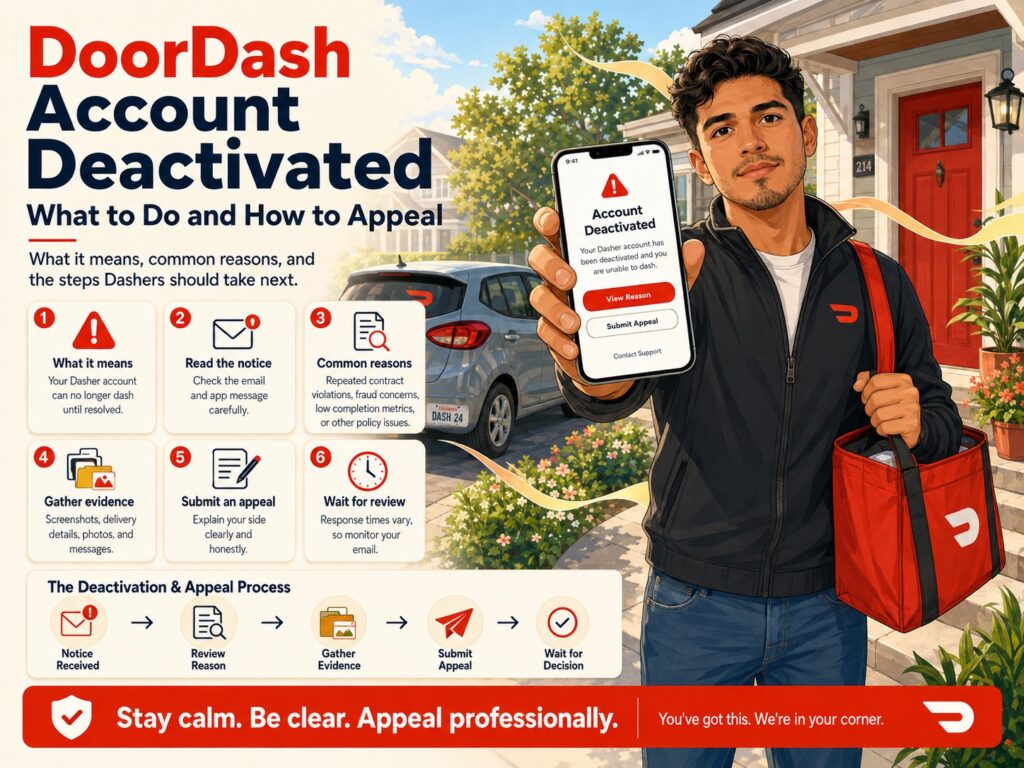
The most important thing to do is determine why DoorDash deactivated your account and then follow the appeal method DoorDash specifically gives you.
As of August 2026, DoorDash says most account deactivations can be appealed directly through the Dasher app. Other cases require an appeal form linked in the deactivation email. DoorDash says the email you receive should explain both the reason for deactivation and which appeal method applies to your account.
For most Dashers, an appeal can be submitted for up to one year after the deactivation date. Seattle Dashers have a shorter 90-day appeal deadline.
This guide explains what to do when your DoorDash account is deactivated, the most common reasons for deactivation, how the 2026 appeal process works, what evidence may help and what mistakes to avoid while trying to get your account reactivated.
What Does DoorDash Deactivation Mean?
A DoorDash account deactivation means DoorDash has removed your access to the Dasher platform.
You generally will not be able to accept new delivery offers unless DoorDash later reverses the decision and reactivates your account.
DoorDash’s current deactivation policy explains that platform access can be removed for reasons involving ratings, Completion Rate, safety, fraud or abuse, background-check eligibility, violations of the Independent Contractor Agreement and other platform-policy violations.
Deactivation is different from:
- Your zone being unavailable
- Dash Now disappearing
- Losing Platinum status
- Temporary app problems
- A single Contract Violation
- A background check temporarily being reviewed
- An individual delivery being placed under review
Before assuming you are permanently locked out, read the exact message in the app and the email DoorDash sent you.
First Thing to Do: Read Your DoorDash Deactivation Email
Do not start your appeal before understanding the reason.
DoorDash says a deactivated Dasher receives an email containing:
- The reason for deactivation
- Information about whether an appeal is available
- Instructions for the appeal method that applies
Search your inbox and spam folder for messages from DoorDash.
Look carefully at the exact wording.
You may see a reason related to:
- Customer Rating
- Completion Rate
- Contract Violations
- Never-delivered orders
- Extreme lateness
- Safety
- Fraud or platform abuse
- Red Card misuse
- Background check
- Identity/account information
- Multiple accounts
- Food tampering
- Unsafe driving
- Violating DoorDash’s Independent Contractor Agreement
The appeal you write should address the specific reason DoorDash gave you.
A generic appeal saying:
I really need this job, please reactivate me.
is usually much weaker than an appeal that directly explains the event DoorDash identified.
Common Reasons DoorDash Accounts Get Deactivated
DoorDash’s current US deactivation policy identifies several categories that can result in losing platform access.
Let’s go through the most important ones.
1. Low Customer Rating
DoorDash requires Dashers to maintain a minimum Customer Rating.
Its current ratings guidance lists the platform minimum as 4.2. If your Customer Rating falls below DoorDash’s required threshold, your account may be deactivated.
Customer Rating is based on customer star ratings rather than your Acceptance Rate.
If your deactivation is related to ratings, review whether:
- DoorDash’s rating calculation was correct
- An eligible unfair rating should have been excluded
- A system issue affected the account
- Your recent customer-rating history supports your appeal
Do not confuse a poor Acceptance Rate with Customer Rating.
DoorDash currently says there is no minimum Acceptance Rate required simply to remain active.
2. Completion Rate Below the Minimum
DoorDash currently requires Dashers to maintain at least a 90% Completion Rate.
DoorDash says Completion Rates below 90% could result in account deactivation.
Completion Rate generally falls when you:
- Accept an offer.
- Later unassign it.
- Do not qualify for a worry-free or excused unassignment.
DoorDash recognizes that emergencies and circumstances outside your control can occasionally prevent completion, but ordinary unassignments generally affect Completion Rate.
If you were deactivated because of Completion Rate, determine whether any of the relevant unassignments involved:
- Emergencies
- App failures
- Safety issues
- Store closures
- Other qualifying circumstances outside your control
Gather evidence before appealing.
3. Multiple Contract Violations
One Contract Violation does not currently constitute grounds for deactivation by itself, according to DoorDash.
However, DoorDash says multiple Contract Violations can lead to deactivation.
Possible Contract Violations include issues such as:
- Order reported never delivered
- Extreme lateness
- Wrong order delivered
- False store-closed reporting
- Red Card misuse
- Causing or encouraging cancellations
- Picking up an order and failing to deliver it
If your deactivation involves Contract Violations, your deactivation email—not Dasher Support—is the key source for appeal instructions. DoorDash says Contract Violation deactivation appeals must use the link provided in the email or the in-app appeal process when available.
4. Marking Orders Delivered When They Were Not Delivered
DoorDash’s deactivation policy specifically states that marking a delivery complete when it was not actually completed can be grounds for deactivation.
This can happen when a Dasher:
- Marks delivered before reaching the customer
- Leaves the order somewhere unrelated to the customer’s location
- Does not follow the customer-unavailable process
- Keeps an order after pickup
For customer-unavailable situations, DoorDash requires reasonable attempts to contact the customer and use of the applicable in-app process before the delivery is considered properly completed.
How to Protect Yourself
For Leave at Door orders:
- Deliver to the correct location
- Take the required photo
- Follow customer instructions
- Do not mark complete before drop-off
For Hand It to Me orders when the customer cannot be found:
- Use the customer-unavailable flow
- Call or message
- Wait as instructed
- Follow the final drop-off or return instructions
5. Repeated or Extreme Lateness
DoorDash requires deliveries to be completed safely and in a timely manner and says failure to make timely or safe deliveries can result in deactivation.
Lateness Contract Violations are different from simply having a less-than-perfect On-Time Rate.
DoorDash evaluates significant lateness using expected safe travel time, while merchant waits and certain other external delays can be excluded.
One lateness Contract Violation does not automatically mean deactivation, but repeated serious lateness can eventually threaten account access.
Common preventable causes include:
- Accepting an order and waiting a long time before leaving
- Personal stops
- Poor multi-apping
- Driving in the wrong direction
- Extended unexplained inactivity
- Delaying delivery after pickup
Do not speed to avoid lateness.
DoorDash separately identifies unsafe driving as potential grounds for deactivation.
6. Unsafe Behavior
DoorDash says creating an unsafe environment can be grounds for immediate deactivation.
Examples listed in the current policy include:
- Violence
- Verbal or physical assault
- Abusive behavior
- Dashing while under the influence of alcohol or drugs
- Discrimination
- Harassment
- Objectively unsafe driving
- Texting while driving
- Failing to use safe practices while interacting with navigation apps
These are among the most serious types of deactivation.
Your appeal should focus on evidence and facts rather than trying to minimize a legitimate safety issue.
7. Unsafe Driving
DoorDash specifically lists unsafe driving, biking or scooting as behavior that can lead to account deactivation.
DoorDash’s policy specifically references conduct such as:
- Texting while driving
- Examining or accepting offers without pulling over when necessary
- Using navigation irresponsibly
- Other objectively unsafe transportation behavior
DoorDash also says it may review Dashers involved in accidents based on the facts and circumstances.
This is another reason never to speed just because the DoorDash timer says an order is late.
8. Criminal Activity or Failure to Follow the Law
DoorDash’s policy says failure to comply with federal, state or local law while using the platform can lead to deactivation.
Examples DoorDash lists include:
- Theft
- Property damage
- Failing to properly check identification for age-restricted deliveries
- Using DoorDash in connection with potentially criminal activity
9. Background Check Problems
DoorDash performs background checks on both prospective and existing Dashers under certain circumstances.
The background check can include:
- Criminal-history information
- Motor Vehicle Report when delivering with a motorized vehicle
DoorDash also says Checkr’s continuous-check functionality may report new information after the original screening.
If DoorDash determines that an active driver no longer satisfies its background-check criteria, the account can be deactivated.
Background-check cases have a different dispute and appeal process, which I explain later in this article.
10. Fraud or Platform Abuse
DoorDash says accounts involved in fraud or platform abuse may be deactivated.
Examples listed in DoorDash’s policy include:
- Manipulating referrals
- Manipulating pay promotions
- Improper Red Card use
- Providing fraudulent or inaccurate information
- Providing false information to Support
- Creating multiple accounts for the same individual
- Misrepresenting your transportation method
- Unauthorized access to DoorDash systems
These cases can be difficult to appeal when DoorDash has strong evidence of intentional activity.
If you believe DoorDash incorrectly identified your activity as fraudulent, your appeal should explain what actually happened and include whatever evidence supports your explanation.
11. Creating Multiple Dasher Accounts
DoorDash’s current policy specifically lists creating multiple accounts for the same individual among examples of fraudulent or inaccurate information and platform abuse.
This is extremely important after deactivation.
Do not respond to deactivation by immediately trying to create another account with:
- Another email
- Another phone number
- A family member’s information
- Different identity information
Trying to bypass a deactivation can make the situation worse.
Use the official appeal process.
12. Red Card Misuse
DoorDash says improper use of the Red Card can lead to account consequences.
Its deactivation policy specifically prohibits using the Red Card to purchase anything other than what is required for an authorized delivery.
Examples of problematic activity may include:
- Personal purchases
- Unauthorized customer items
- Spending outside an eligible order
- Manipulating Shop and Deliver purchases
Use the Red Card only through the approved DoorDash order process.
13. Food Tampering
DoorDash’s policy prohibits opening, consuming, using or tampering with customer orders.
This includes obvious behavior such as eating a customer’s food.
But it also means you should not open sealed restaurant bags simply because you want to check whether every item is included.
Ask the restaurant to confirm the contents instead.
14. Failure to Maintain Food-Safety Standards
DoorDash’s policy also identifies failure to maintain food-safety standards as grounds for account action and specifically references use of an insulated hot bag.
Keep delivery equipment clean and handle orders professionally.
15. Disclosing Customer Information
DoorDash prohibits unauthorized disclosure of personal information obtained through the platform.
DoorDash says customer information should be used only to complete the delivery and should not be posted online or shared with third parties except where legally required.
Be particularly careful when posting screenshots online.
Before sharing any DoorDash screenshot publicly, remove:
- Customer name
- Address
- Phone number
- Order information
- Other identifying data
How to Appeal a DoorDash Deactivation in 2026
DoorDash currently uses two primary appeal methods:
- In-app appeal
- Appeal form
The deactivation email tells you which process applies.
Do not choose whichever one you prefer.
Follow the instructions DoorDash gives you.
Method 1: DoorDash In-App Deactivation Appeal
DoorDash says most account deactivations can now be appealed directly inside the Dasher app.
When your deactivation qualifies for an in-app appeal, the deactivation email will tell you that you can appeal through the Dasher app.
Step 1: Log In to the Dasher App
Open the app using your normal account.
A deactivation screen should appear.
Step 2: Tap “Start Appeal”
DoorDash says eligible accounts will display a Start appeal button.
Tap it.
Step 3: Read the Deactivation Reason Carefully
Before typing anything, make sure you understand DoorDash’s allegation.
Do not write your appeal based on what you think happened.
Address the exact reason DoorDash provides.
Step 4: Add Your Explanation
DoorDash provides an Add details section where you can explain why you believe the account should be reactivated.
This is where you should provide:
- What happened
- Why DoorDash’s conclusion may be incorrect
- Circumstances outside your control
- Evidence supporting your account
- Corrective actions when appropriate
Step 5: Review Everything Before Submitting
This is important.
DoorDash says that after an in-app appeal is submitted, you cannot go back and add information to that appeal submission.
Do not rush.
Review your explanation before tapping Submit.
Step 6: Submit Appeal
After submitting, DoorDash says the Dasher app provides status information including:
- Confirmation that the appeal was received
- An estimated resolution timeframe
- Current appeal status
Check the app for updates rather than repeatedly submitting new appeals.
Method 2: DoorDash Deactivation Appeal Form
Some deactivations cannot be appealed through the app.
In those cases, DoorDash says your deactivation email will direct you to an official appeal form.
Complete the form with:
- Requested account information
- Details about the deactivation
- Your explanation
- Supporting information
DoorDash says a specialized team reviews these appeals and sends the decision by email.
Again, use the appeal route specified in your deactivation email.
How Long Do You Have to Appeal a DoorDash Deactivation?
For most Dashers:
Up to one year from the deactivation date
For Seattle Dashers:
90 days
DoorDash publishes these deadlines in its current appeal guidance.
Even though you may have up to a year, I would not intentionally wait months when you already have the information needed to make a strong appeal.
Submit when your appeal is complete and supported.
How Long Does DoorDash Take to Review an Appeal?
DoorDash does not currently publish one universal number of days that applies to every appeal.
For eligible in-app appeals, DoorDash says the Dasher app will show:
- Confirmation of receipt
- An estimated resolution timeframe
- Status updates while the appeal is being reviewed
Appeal-form cases are reviewed by a specialized team, with a response sent by email.
Because different deactivations require different investigations, avoid relying on someone else’s timeline.
One driver may receive a decision quickly while another case requires more review.
What Happens if Your DoorDash Appeal Is Approved?
For an approved in-app appeal, DoorDash says you will receive:
- Push notification
- SMS notification
- Reactivation of the Dasher account
Once reactivated, you should be able to log into the app and dash again.
Before immediately starting a 12-hour shift, review:
- Ratings
- Account information
- Payment settings
- Scheduled dashes
- Any remaining notices
Make sure everything is correct.
What Happens if DoorDash Denies Your Appeal?
DoorDash says an unsuccessful in-app appeal produces:
- Email notification
- Push notification
- SMS notification
- Updated appeal status in the Dasher app
A denial does not always mean you can never appeal again.
For the current in-app appeal process, DoorDash says you can submit another appeal after waiting 90 days.
When the 90-day period has passed, eligible Dashers can log in and use Start new appeal.
Do not simply resubmit the exact same explanation.
Before the next appeal, ask:
- What evidence was missing?
- Was my first explanation unclear?
- Can I provide documentation?
- Did I misunderstand the deactivation reason?
- Is there new information?
A second appeal should ideally be stronger than the first.
How to Write a Strong DoorDash Deactivation Appeal
Your appeal does not need to be long.
It needs to be:
- Accurate
- Specific
- Professional
- Relevant
- Supported by evidence
A strong appeal generally follows this structure.
1. State the Deactivation Reason
Show DoorDash you understand the issue.
For example:
My account was deactivated for an alleged undelivered order on August 12.
2. Explain What Happened
Describe the event chronologically.
For example:
I delivered the order to the address shown in the Dasher app and followed the Leave at Door instructions.
3. Mention Your Evidence
For example:
I submitted the required drop-off photo showing the order at the customer’s front door.
4. Explain Any Outside Circumstances
For example:
The delivery was delayed because of a road closure that required traffic to use a posted detour.
5. Request Review
Finish politely.
For example:
I respectfully request that DoorDash review the delivery records, GPS information and drop-off photo and reconsider my account deactivation.
Do not fill the appeal with unrelated information.
Sample DoorDash Deactivation Appeal
Here is a useful general structure:
I am appealing the deactivation of my Dasher account related to [reason stated by DoorDash]. On [date], I accepted the order from [merchant] and followed the delivery instructions shown in the Dasher app. [Brief explanation of what happened.] I have [drop-off photo, screenshot, Support conversation, customer messages, or other evidence] supporting my account of the delivery. I respectfully request that DoorDash review the available delivery records, GPS information and supporting documentation and reconsider the deactivation of my account.
Customize it.
Do not copy a generic appeal from the internet without addressing your actual case.
Example: Appeal for Order Never Delivered
My account was deactivated because of an order reported as not delivered. I completed the delivery to the address shown in the Dasher app and followed the Leave at Door instructions. I took and submitted the required delivery photo showing the order at the customer’s doorway. I respectfully ask DoorDash to review my GPS history, delivery photo and completion records for this order.
Example: Appeal for Extreme Lateness
I am appealing my deactivation related to extreme lateness. The affected delivery experienced an unexpected road closure that required traffic to take a significant detour. After pickup, I traveled directly toward the customer’s address and did not make personal stops. I respectfully request that DoorDash review the GPS route and traffic conditions associated with the delivery.
Example: Appeal for Low Completion Rate Caused by Emergencies
I am appealing my account deactivation related to Completion Rate. Several recent unassignments occurred because of circumstances outside my control, including [brief specific circumstances]. I reported the issues through the Dasher app/Support at the time. I respectfully request a review of those affected deliveries and the associated support records.
Do not claim an emergency unless one actually happened.
Evidence That Can Help a DoorDash Appeal
Depending on the reason, useful evidence may include:
- Drop-off photos
- Screenshots
- Customer messages
- DoorDash Support chats
- Order receipts
- Restaurant closure photos
- Road-closure documentation
- Accident documentation
- Vehicle breakdown records
- Police reports
- Insurance documentation
- Medical/emergency documentation when relevant
- Background-check documents
- GPS/location evidence
- Email correspondence
Only submit relevant documents.
Ten unrelated screenshots do not make an appeal stronger.
Take Screenshots When Problems Happen
As a long-term habit, I recommend documenting unusual delivery problems.
You do not need to photograph every detail of every ordinary DoorDash order.
But take screenshots when something important happens, such as:
- App error
- Incorrect customer address
- Customer requesting a major change
- Support giving unusual instructions
- Restaurant unexpectedly closed
- Customer threatening you
- Road closure affecting the delivery
- Order cancellation problem
A five-second screenshot today may become valuable evidence later.
Avoid storing or publicly sharing customer personal information unnecessarily.
Can DoorDash Support Reactivate Your Account?
For deactivation appeals, DoorDash directs Dashers to the official appeal process.
DoorDash’s Contract Violations guidance specifically says that you cannot appeal a Contract Violation deactivation simply by contacting Dasher Support. You must use the appeal link in the deactivation email or the in-app Start appeal option when applicable.
Support may help with technical questions, but do not expect a regular support agent to manually overturn a deactivation.
Follow the designated appeal process.
Should You Call DoorDash Support Repeatedly?
Usually not.
Repeated calls do not replace the appeal process.
Once you have submitted the correct appeal:
- Save confirmation
- Monitor the Dasher app
- Monitor email
- Monitor SMS/push notifications
DoorDash says eligible in-app appeals provide status updates directly through the app.
Can You Make Another DoorDash Account After Deactivation?
Do not try to bypass deactivation by making a second account.
DoorDash’s policy specifically lists creating multiple accounts for the same individual among examples of providing fraudulent or inaccurate information and platform abuse.
Trying to create another account using:
- Different email
- Different phone number
- Another person’s identity
could create additional problems.
Appeal the original account.
What if DoorDash Deactivated You Because of a Background Check?
Background-check deactivations follow a special process.
DoorDash says active Dashers whose background check raises potentially disqualifying information first receive a Pre-Adverse Action Notice.
You then generally have:
14 days
to respond before DoorDash makes its final decision.
There are two different situations.
The Background Check Is Incorrect
Examples:
- Record belongs to someone else
- Charge information is incorrect
- Record is outdated
- Disposition is wrong
DoorDash instructs Dashers to dispute inaccurate information directly through Checkr’s Candidate Portal.
The Background Check Is Accurate, but You Want DoorDash to Consider Additional Information
DoorDash says you can provide mitigating information for review.
Potential supporting materials listed by DoorDash include evidence involving:
- School
- Job training
- Counseling
- Community involvement
- Rehabilitation
- Good conduct
- Occupational certifications
- Community service
- Letters of recommendation
DoorDash’s current background-check guidance directs these cases to its dedicated background-check review process.
Post-Adverse Action Notice
If more than 14 days pass and DoorDash decides to deactivate based on the report, you may receive a Post-Adverse Action Notice.
DoorDash says you may still dispute inaccurate Checkr information and may also submit a deactivation appeal through the process provided.
What if DoorDash Deactivated You by Mistake?
Mistakes can happen.
Your job in an appeal is to make the error easy to identify.
For example:
DoorDash says:
Order never delivered.
Your evidence:
- Correct GPS location
- Timestamped photo
- Correct house number visible
- Customer message confirming receipt
That creates a clear argument.
Another example:
DoorDash says:
Store falsely reported closed.
Your evidence:
- Locked entrance
- Posted closure sign
- Photo submitted through app
- Merchant voicemail stating store closed
Again, the evidence directly addresses the reason.
The strongest appeal is often not the longest.
It is the one where:
DoorDash’s allegation + your evidence = clear contradiction.
What if You Actually Made a Mistake?
You do not necessarily need to pretend you did nothing wrong when the evidence says otherwise.
Depending on the situation, a more credible appeal may acknowledge:
- What happened
- Why it happened
- What you learned
- What you changed
For example:
I recognize that I handled the customer-unavailable process incorrectly. I now understand that I should have used the in-app Can’t Find Customer process and waited for the required instructions before completing the order. I have reviewed the current delivery procedures and will follow that process going forward. I respectfully request another opportunity to use the platform.
There is no guarantee DoorDash will reactivate the account.
But a factual appeal is better than making a claim DoorDash can easily disprove using GPS or app records.
What Not to Write in a DoorDash Appeal
Avoid appeals like:
DoorDash is a scam and you people are lying.
or:
I didn’t do anything wrong ever.
or:
I have five kids so you have to give my account back.
or:
If you don’t reactivate me I’m creating another account.
These statements do not address the evidence.
Your personal financial situation can explain why account access matters to you, but it does not prove that DoorDash made the wrong decision.
Focus on the reason for deactivation.
Do Not Blame the Customer Without Evidence
A common response to a never-delivered violation is:
The customer was obviously scamming DoorDash.
That may or may not be true.
A stronger appeal says:
I followed the Leave at Door instructions and submitted the required photo. My GPS should also show that I was at the delivery address. I respectfully request that DoorDash review those records.
Let the evidence support your position.
Can One Customer Get Your DoorDash Account Deactivated?
One customer complaint does not automatically mean DoorDash will deactivate every Dasher.
DoorDash uses various platform policies, ratings systems, Contract Violation processes and internal reviews when evaluating account access.
DoorDash currently says one Contract Violation alone is not grounds for deactivation, while multiple violations can lead to deactivation.
However, extremely serious conduct may be handled differently under DoorDash’s safety and platform policies.
Does One Accident Get You Deactivated?
Not automatically.
DoorDash’s policy says it evaluates Dashers involved in accidents for possible deactivation based on the relevant facts and circumstances.
An accident caused by objectively unsafe driving may be treated differently from an unavoidable incident where the Dasher followed traffic laws.
Always:
- Prioritize safety
- Follow legal reporting requirements
- Contact emergency services when appropriate
- Contact DoorDash when an active delivery is affected
Can Acceptance Rate Get You Deactivated?
DoorDash currently states that there is no minimum Acceptance Rate required to stay active.
Acceptance Rate can influence Rewards and priority features in some markets, but a low Acceptance Rate by itself is not currently listed as a platform minimum.
Do not confuse Acceptance Rate with:
- Completion Rate
- Customer Rating
- Contract Violations
Can Completion Rate Get You Deactivated?
Yes.
DoorDash currently requires at least:
90% Completion Rate
and says falling below the threshold could result in deactivation.
Can Customer Rating Get You Deactivated?
Yes.
DoorDash requires Dashers to maintain its Customer Rating threshold and says accounts may be deactivated when the rating falls below that requirement.
The current minimum shown in DoorDash’s ratings guidance is 4.2.
Do Contract Violations Automatically Deactivate You?
No.
DoorDash currently says one Contract Violation does not constitute grounds for deactivation.
Multiple violations can lead to deactivation.
Can DoorDash Deactivate You Without a Contract Violation First?
Yes.
Some conduct can lead directly to deactivation under DoorDash’s policy.
Examples include serious safety or platform-integrity problems such as:
- Violence
- Drug or alcohol impairment while dashing
- Serious harassment
- Unsafe driving
- Criminal activity
- Fraud
- Platform abuse
So you should not assume:
No Contract Violations = no possibility of deactivation.
DoorDash Account Deactivated but Money Still in the Account
Deactivation does not automatically erase legitimate earnings for deliveries you actually completed.
DoorDash’s Contract Violations guidance says Dashers are paid for services actually performed and Contract Violations do not reduce pay on future offers.
Payment access may vary depending on the specific account situation, payment method and whether certain suspicious transactions are separately under review.
Keep copies of your:
- Earnings statements
- Bank deposits
- Crimson records
- Tax records
You will still need those records even if you stop dashing permanently.
Can You Still Get Your DoorDash 1099 After Deactivation?
Yes, deactivation does not eliminate your tax responsibilities.
You still need to report taxable DoorDash income.
DoorDash’s tax guidance provides a process for eligible Dashers to obtain tax documents, including cases where a driver no longer has normal app access.
Keep your current:
- Mailing address
- Tax information
accurate whenever possible.
How to Prevent Future Deactivation After Reactivation
If DoorDash restores your account, treat the reactivation as an opportunity to tighten up your delivery routine.
Protect Your Customer Rating
- Follow instructions
- Use a hot bag
- Check visible drinks
- Deliver to the correct address
- Take clear drop-off photos
Protect Your Completion Rate
- Review offers before accepting
- Avoid unnecessary unassignments
- Maintain at least 90%
Avoid Contract Violations
- Never falsely mark delivered
- Follow customer-unavailable procedures
- Verify stacked orders
- Report stores accurately
- Avoid extreme lateness
Protect Account Security
- Never share verification codes
- Use a strong password
- Avoid giving account access to another person
Use the Red Card Correctly
Only for authorized purchases.
Drive Safely
No order is worth:
- Speeding ticket
- Accident
- Injury
- Deactivation
DoorDash Deactivation Checklist
When your account is deactivated:
- Read the app message.
- Find the official deactivation email.
- Identify the exact reason.
- Determine whether the appeal is in-app or through the appeal form.
- Gather screenshots and evidence.
- Write a short factual explanation.
- Review everything carefully.
- Submit through the official process.
- Save confirmation.
- Monitor app, email and phone notifications.
- Do not create a second account.
- If an eligible in-app appeal is denied, consider a new appeal after the current 90-day waiting period.
Frequently Asked Questions
Why did DoorDash deactivate my account?
Possible reasons include low Customer Rating, Completion Rate below the required threshold, repeated Contract Violations, safety violations, fraud, Red Card misuse, inaccurate account information, background-check issues or violations of the Independent Contractor Agreement.
How do I find out why I was deactivated?
DoorDash says your deactivation email should contain the reason and appeal instructions.
Can I appeal a DoorDash deactivation?
Most deactivations can be appealed. DoorDash currently uses either an in-app appeal or an appeal form, depending on the case.
How do I appeal in the Dasher app?
For eligible cases:
- Log in.
- Tap Start appeal.
- Add your explanation.
- Review everything.
- Submit.
DoorDash then provides appeal-status updates in the app.
Can I add more information after submitting an in-app appeal?
DoorDash currently says you cannot add more information to the same in-app appeal after submission, so complete the Add Details section before submitting.
How long do I have to appeal?
Most Dashers have up to one year from the deactivation date.
Seattle Dashers have 90 days.
How long does DoorDash take to review an appeal?
DoorDash does not publish one universal review period. For in-app appeals, the app displays an estimated resolution timeframe and status updates.
What happens if my appeal is approved?
DoorDash says accepted in-app appeals generate push and SMS notifications, and the account is reactivated so the Dasher can return to dashing.
What happens if my appeal is denied?
DoorDash says you receive an email, push and SMS notification for an in-app denial. Eligible Dashers can submit another appeal after waiting 90 days.
Can DoorDash Support reactivate me?
Support does not replace the deactivation appeal process. DoorDash instructs Dashers to use the in-app appeal or the appeal instructions contained in the deactivation email.
Can I make a second account?
Do not attempt to bypass a deactivation by creating another account. DoorDash lists creating multiple accounts for one individual among examples of platform abuse or fraudulent/inaccurate information.
Can low Acceptance Rate deactivate me?
DoorDash currently says there is no minimum Acceptance Rate required to remain active.
Can low Completion Rate deactivate me?
Yes. DoorDash currently requires at least a 90% Completion Rate and warns that falling below the requirement could result in deactivation.
Can low Customer Rating deactivate me?
Yes. DoorDash’s deactivation policy says accounts can be deactivated when Customer Rating falls below the required threshold.
What is the minimum Customer Rating?
DoorDash’s current ratings page lists 4.2.
Will one Contract Violation deactivate me?
DoorDash says one Contract Violation does not currently constitute grounds for deactivation, but multiple violations can.
Can extreme lateness get me deactivated?
Repeated serious lateness can lead to Contract Violations and potentially deactivation.
Can DoorDash deactivate me after a new background check?
Yes. DoorDash reruns background checks under certain circumstances and says a Dasher can be deactivated when new information means the driver no longer meets its background-check criteria.
How do I dispute incorrect background-check information?
DoorDash directs Dashers to dispute inaccurate Checkr report information through Checkr’s Candidate Portal.
What if the background-check information is accurate but I want DoorDash to reconsider?
DoorDash allows Dashers to provide mitigating information and supporting evidence such as rehabilitation records, training, community involvement and recommendations through its background-check review process.
How long do I have after a Pre-Adverse Action Notice?
DoorDash currently gives active Dashers 14 days after the Pre-Adverse Action Notice to dispute the report or provide additional information before a decision is made.
Can I be deactivated for unsafe driving?
Yes. DoorDash lists objectively unsafe driving, biking or scooting as potential grounds for deactivation.
Can I be deactivated for using someone else’s DoorDash account?
Using inaccurate account information, creating multiple accounts and circumventing account security can violate DoorDash’s platform policies.
Can I be deactivated for Red Card misuse?
Yes. DoorDash lists improper Red Card purchases among examples of platform abuse.
Can I be deactivated for opening a customer’s food?
DoorDash prohibits opening, consuming or tampering with customer deliveries.
Can DoorDash deactivate me for posting customer information online?
DoorDash prohibits unauthorized disclosure of personal information obtained through the platform.
Final Thoughts
A DoorDash deactivation can feel devastating, especially when you depend on dashing for regular income.
But receiving a deactivation notice does not automatically mean you have no options.
DoorDash’s current 2026 process allows most deactivated Dashers to appeal either:
- Directly through the Dasher app, or
- Through the appeal form specified in the deactivation email.
For most Dashers, the appeal window is up to one year, while Seattle Dashers generally have 90 days.
The most important thing is to appeal correctly.
Do not immediately create another account.
Do not spam Support.
Do not submit an emotional explanation that ignores the actual deactivation reason.
Instead:
- Read the deactivation notice carefully.
- Identify exactly what DoorDash says happened.
- Gather relevant evidence.
- Explain the situation clearly.
- Submit through the correct appeal channel.
And if you made a genuine mistake, acknowledge it when appropriate and explain what has changed.
DoorDash has access to information such as delivery activity, account records and platform interactions. An appeal that is factual and consistent with the available evidence is much stronger than one built around denial alone.
If your account is reactivated, protect it.
Maintain your ratings. Complete accepted deliveries. Follow the customer-unavailable process. Use the Red Card properly. Keep customer information private. Never manipulate the platform. And always put safe driving ahead of delivery speed.
For many Dashers, the account is a valuable source of income.
Treat it that way.
