
You arrive at the customer’s apartment.
The instructions say:
Hand it to me.
You knock.
Nothing.
You call.
No answer.
You send a message.
Still nothing.
Now what?
This is one of those DoorDash situations that seems simple until it actually happens. You already picked up the food, you are at the destination, and the customer has disappeared.
The most important thing is not to improvise.
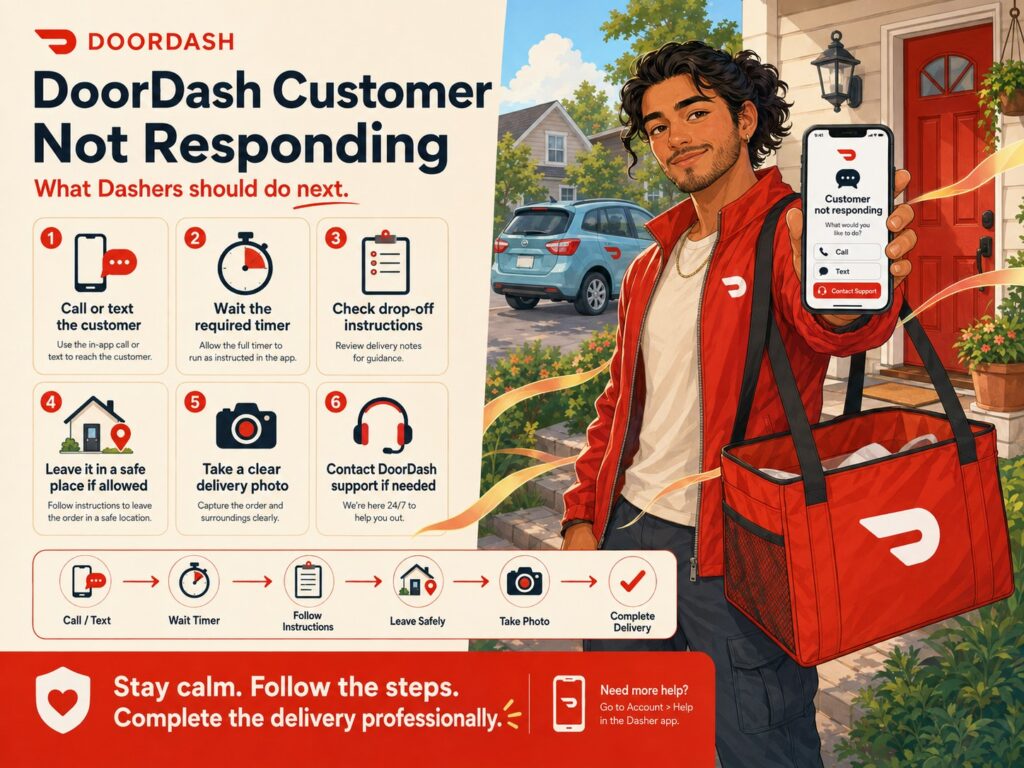
DoorDash has a specific customer-unavailable process. For a normal Hand It to Me delivery, DoorDash currently instructs Dashers to open Help → Drop-off issues → Reached drop-off location → Can’t reach customer, attempt both a call and a text, wait for the in-app timer, and then follow the app’s instructions for either leaving the order safely or completing a required return.
DoorDash also warns that simply taking the food and leaving without either handing it to the customer or completing the official customer-unavailable process can put your account at risk.
The exact process also changes depending on the delivery.
A customer who does not respond on a normal restaurant order is different from a customer who does not respond for:
- Alcohol
- Cash on Delivery
- PIN-required delivery
- Shop and Deliver substitution
- Pharmacy or other return-required delivery
This guide explains what DoorDash drivers should do when the customer does not answer, how the five-minute Hand It to Me process works, where to leave food, when you should not leave an order, and how to protect yourself from an Order Never Delivered complaint.
DoorDash Customer Not Responding: Quick Answer
If you cannot reach a customer during a normal delivery:
- Make sure you are at the correct address.
- Read the customer’s delivery instructions again.
- Call the customer.
- Send the customer a message.
- For a Hand It to Me order, open Help → Drop-off issues → Reached drop-off location → Can’t reach customer.
- Start and complete the in-app customer-unavailable timer.
- If DoorDash allows you to leave the order, place it somewhere safe.
- Take the required photo.
- Add a description explaining where the order was left.
- Complete the delivery through the app.
DoorDash’s current Contract Violations guidance specifies a five-minute wait at the delivery location for the Hand It to Me customer-unavailable flow.
However, do not automatically use these steps for alcohol or another delivery that requires a return. Those orders can have different instructions.
First: Check Whether It Is Hand It to Me or Leave at Door
Before doing anything else, read the delivery instructions carefully.
DoorDash distinguishes between:
Hand It to Me
The customer expects the order to be handed directly to them.
Leave It at My Door
The customer has already authorized a contactless drop-off.
These two delivery types have different completion procedures. DoorDash specifically warns Dashers to pay attention to the selected delivery method because failing to follow the applicable steps can lead to account review.
Customer Not Responding on a Leave at Door Order
This is usually the easier situation.
Suppose the instructions say:
Leave at my door.
You reach the correct address.
You do not need the customer to physically come outside before completing a normal contactless delivery.
Follow the DoorDash drop-off instructions:
- Leave the order at the proper location.
- Take a clear photo.
- Add a description when applicable.
- Complete the delivery.
DoorDash says Leave at Door deliveries require a clear photo of the order at the proper drop-off location. A description of where the food was left can also help the customer locate it.
So if the customer does not answer your:
I’m here.
message, that by itself usually does not stop you from completing a standard Leave at Door order.
The customer already requested contactless delivery.
What If You Cannot Find the Door on a Leave at Door Order?
This is different.
Maybe the customer wrote:
Leave at apartment door.
But you cannot locate:
- The building
- The apartment
- The entrance
- The gate
- The correct unit
DoorDash says that if you cannot find the customer’s address or door on a Leave at Door delivery, you should try contacting the customer by text or phone. If the customer remains unresponsive, follow the in-app instructions, including leaving the order at a safe location when permitted, taking a clear photo and providing a description.
Do not simply leave the food at a completely unrelated building because the customer did not answer.
You still need to make a reasonable effort to complete the delivery correctly.
Customer Not Responding on a Hand It to Me Order
This is the situation where the DoorDash customer-unavailable process becomes especially important.
DoorDash says that if the customer selected Hand It to Me but you cannot find them, use the app’s customer-unavailable flow rather than simply abandoning the order.
The current process is:
Step 1: Go to the Correct Drop-Off Location
Before starting the customer-unavailable process, make sure you are actually at the destination.
Check:
- Street number
- Apartment number
- Business name
- Hotel
- Building letter
- GPS location
- Delivery instructions
Sometimes the “unresponsive customer” problem is actually:
wrong building.
Step 2: Open Drop-Off Issues
DoorDash currently says to navigate to:
Help → Drop-off issues → Reached drop-off location → Can’t reach customer
The exact wording can change slightly between app versions, but follow the active prompts shown on your screen.
Step 3: Call the Customer
DoorDash tells Dashers to attempt a phone call.
The customer may:
- Not notice your message
- Have notifications turned off
- Be waiting somewhere else
- Be inside a large building
- Expect a phone call
Calling gives them another opportunity to respond.
Step 4: Send a Text or In-App Message
Do both when possible.
DoorDash specifically recommends trying both calls and texts because some customers may not receive DoorDash texts while others may ignore or be unable to answer calls from an unfamiliar number.
A simple message is enough:
Hi! I’ve arrived with your DoorDash order and I’m at the delivery location. Please let me know where you’d like me to meet you.
Do not send:
Answer your phone or I’m leaving.
Keep it professional.
Step 5: Start the Customer-Unavailable Timer
DoorDash’s current Contract Violations instructions say that for a Hand It to Me delivery where you cannot find the customer, you should wait five minutes at your location after starting the appropriate flow.
The app may display a countdown.
If the customer appears during the timer, DoorDash says you can select the option indicating that you found the customer and complete the handoff normally.
Step 6: Follow the App After the Timer Expires
If the customer still has not appeared, DoorDash will guide you to the next step.
For a normal food order that does not require a return, this can include:
- Leaving the order somewhere safe
- Taking a clear photo
- Adding a description
- Completing the delivery
If the order requires a return, the app will instead tell you what to do.
Where Should You Leave a DoorDash Order When the Customer Does Not Answer?
DoorDash says that when the app permits a safe drop-off after the timer, examples of appropriate locations can include:
- In front of the customer’s unit
- At the front door
- With a receptionist or doorman
- In a mailroom
provided the location is safe and appropriate.
Use common sense.
A good drop-off location should be:
- As close as reasonably possible to the customer’s intended destination
- Protected from traffic
- Protected from weather when possible
- Easy for the customer to identify
- Not blocking a doorway
- Not obviously exposed to theft when a better option exists
Take a Clear Photo
The photo matters.
DoorDash says that after using the Hand It to Me unavailable-customer flow and leaving the order, you must document the location with a picture and description.
A useful photo should show:
- The food
- The doorway or location
- Enough surrounding detail to help identify the spot
For a contactless delivery, DoorDash also recommends capturing both the food and the location where it was left.
Try not to take a photo that shows nothing except a close-up of a brown paper bag.
The goal is to answer:
Where exactly did you leave this?
Add a Useful Description
For example:
Left beside the front entrance, next to the blue planter.
or:
Left with the front desk receptionist.
or:
Left outside Building C near the main entrance because I could not access the locked building.
That is much more useful than:
Delivered.
DoorDash specifically requires a description in the Hand It to Me unavailable-customer drop-off flow.
Do Not Take the Food With You
This is extremely important.
DoorDash says that failing to hand the food to the customer or complete the required customer-unavailable steps can put the account at risk.
Its current guidance states that taking the food with you instead of following the process can be considered a failure to complete the delivery and may be grounds for deactivation.
So do not think:
Customer didn’t answer. Free dinner.
That is not the correct process.
Why You Should Not Skip the Timer
Suppose the customer says Hand It to Me.
You arrive.
Nobody answers after 30 seconds.
You immediately leave the order by the gate and mark it complete.
The customer later says:
My order was never delivered.
You now have a much weaker record because you did not follow the DoorDash customer-unavailable process.
DoorDash says that when a customer reports a missing order, it reviews the delivery details to determine whether the required unavailable-customer steps were followed. Failing to follow them can make the account eligible for deactivation.
The timer may feel annoying when you are trying to earn quickly.
But that five-minute process can protect your account.
Customer Is Not Responding at an Apartment Complex
Apartments are probably the most common place where this problem becomes complicated.
You may have:
- No gate code
- Locked lobby
- Missing building number
- No apartment number
- Broken call box
Start communicating before you become completely stuck.
For example, while safely parked at the restaurant you might notice:
Apt 842
but no gate code.
Send:
Hi! I’m on the way with your order. I noticed the delivery is inside a gated complex but I don’t see an access code. Could you please send it? Thanks!
If there is no response by the time you arrive, you already have a record showing you tried to solve the problem early.
No Gate Code and Customer Does Not Answer
Do not:
- Tailgate another car through a restricted gate if unsafe or prohibited
- Climb a gate
- Wander indefinitely
- Leave the food somewhere completely unrelated without using the app flow
If you cannot access the customer’s location, begin the appropriate customer-unavailable process once you are at the delivery location DoorDash recognizes.
Call.
Text.
Wait for the timer.
Then follow the app’s instructions for the safe drop-off or return.
Customer Does Not Answer at a Hotel
Hotels can create similar problems.
Maybe the instructions say:
Room 1107
but the hotel does not allow delivery drivers upstairs.
Try contacting the customer.
If they do not answer, ask whether the hotel has an approved:
- Front desk
- Lobby table
- Delivery area
DoorDash lists receptionists and doormen among examples of safe alternative drop-off locations when the customer cannot be reached and the app permits the order to be left.
Document exactly where you leave it.
For example:
Left with the front desk under the customer’s name because hotel security does not allow delivery access to guest floors.
Customer Does Not Answer at a Business
Businesses create different access problems:
- Office door locked
- Reception closed
- Large warehouse
- Multiple entrances
- Customer is in a meeting
Again:
- Call.
- Message.
- Use the customer-unavailable flow when necessary.
- Follow the app instructions.
If a receptionist can properly accept the order and DoorDash permits that type of safe drop-off, document the handoff or location accurately.
Customer Put the Wrong Address and Does Not Respond
Do not guess.
If the written address appears incorrect and the customer is unreachable:
- Check the delivery address again.
- Compare it with the map.
- Use the in-app Help options.
- Contact DoorDash Support if the address problem cannot be resolved.
Do not drive around the city trying random locations.
And do not deliver to a different address unless DoorDash’s process tells you how to handle the change.
Customer Calls After the Timer Ends
Suppose you:
- Called.
- Texted.
- Waited five minutes.
- Followed the DoorDash process.
- Left the order safely.
- Submitted the photo.
- Completed the delivery.
Then two minutes later the customer calls.
You can politely explain where the order was left.
For example:
Hi! I wasn’t able to reach you during the DoorDash waiting period, so I followed the app instructions and left the order with the front desk. The drop-off photo and location should also be visible in the app.
There is generally no reason to turn around if you already completed the proper delivery process unless DoorDash instructs otherwise.
Customer Takes a Leave at Door Order From You
Sometimes the instructions say:
Leave at Door
but the customer suddenly walks outside and takes the bag.
DoorDash says that if the customer physically takes the food before you can take the normal Leave at Door photo, use:
I handed the order to the customer
when that option is available.
DoorDash specifically says this option should be used only when the customer really received the order directly.
Do not routinely use it just to avoid taking drop-off photos.
The Customer Says “Just Leave It” on a Hand It to Me Order
This is common.
The order says:
Hand it to me
but the customer messages:
Just leave it by the door.
If the customer clearly communicates the requested change through DoorDash, follow the applicable app instructions and document the drop-off carefully.
I would still take a clear photo when the app allows it because the delivery is no longer being physically handed to the customer.
The key is having a clear record of:
- Customer instruction
- Drop-off location
- Delivery completion
If the app’s workflow conflicts with what you are seeing, use the Help options.
Do You Need to Contact Support Every Time a Customer Does Not Answer?
Usually, no.
DoorDash has built the customer-unavailable flow into the Dasher app specifically so many of these situations can be resolved without calling Support.
Use Support when:
- The unavailable-customer option is missing.
- The app will not let you continue.
- There is no safe place to leave the order.
- A required-return situation is unclear.
- The address is seriously incorrect.
- The delivery creates a safety concern.
- You cannot complete the app workflow.
DoorDash currently provides 24/7 Dasher chat and phone support, and its US Dasher number is 855-431-0459.
Do Not Ask Support to Cancel a Normal Order Just Because the Customer Is Slow
A customer taking a few minutes to answer does not automatically mean the order should be canceled.
Start the correct customer-unavailable process.
DoorDash’s Contract Violations guidance also warns Dashers not to encourage or pressure customers to cancel orders as a way to avoid completing the delivery.
Do not message:
Cancel the order because I can’t find you.
Use the app.
Customer Not Responding During Shop and Deliver
This can happen before you reach the customer’s home.
You are shopping.
An item is unavailable.
There are no pre-approved substitutions.
You message the customer.
Nothing.
You call.
No response.
DoorDash currently says that when a Shop and Deliver customer does not answer before checkout, you should mark the affected item:
Item unavailable
and then:
Issue refund
when that is what the app provides.
Do not stand in the grocery aisle for 30 minutes waiting for the customer.
And do not invent your own substitution unless DoorDash’s app allows it.
Shop and Deliver Example
Customer ordered:
12-pack Coke Zero
Store is out.
No pre-approved substitution.
You offer:
- Diet Coke
- Coke Zero 6-pack
No reply.
DoorDash says to mark the item unavailable and issue a refund through the app if the customer still does not respond before checkout.
Then continue with the rest of the order.
Customer Not Responding on a PIN Delivery
DoorDash is also rolling out deliveries requiring a four-digit PIN.
For these orders, the customer gives you the PIN and you enter it into the Dasher app to confirm the handoff.
If you cannot find the customer or collect the PIN, DoorDash says to use:
Cannot Collect PIN
and follow the in-app process.
DoorDash specifically instructs Dashers to:
- Call the customer
- Message the customer
- Provide a photo
- Provide a description
as directed by the app.
Do not guess the PIN.
Do not enter random numbers.
Follow the app.
Customer Is There but Cannot Provide the PIN
Same process.
DoorDash says that if the customer cannot provide the required four-digit code, use the Cannot Collect PIN steps in the app rather than bypassing the verification.
The PIN is part of the delivery-confirmation process.
Customer Not Responding on an Alcohol Delivery
This is completely different from normal food delivery.
You cannot simply:
Leave the alcohol at the door.
DoorDash states that alcohol must never be left unattended.
If the customer does not answer:
- Follow Customer isn’t Available on Android or Can’t reach the customer on iOS.
- Complete the customer-unavailable timer.
- Follow the app’s next instruction.
- Return or dispose of the alcohol exactly as DoorDash instructs.
DoorDash says alcohol cannot under any circumstances be left unattended at the customer’s door.
Why Alcohol Is Different
A normal restaurant bag can often be left safely after the customer-unavailable timer.
Alcohol requires:
- Customer presence
- Required identification verification
- Compliance with alcohol-delivery rules
DoorDash’s alcohol guidelines also say drivers must meet the recipient, verify an acceptable ID and assess required eligibility before handing over alcohol.
No customer means no normal alcohol handoff.
Mixed Grocery Order With Alcohol
Suppose the order includes:
- Bread
- Milk
- Frozen pizza
- Bottle of wine
The customer never comes out.
DoorDash says that for an order containing both alcohol and non-alcohol items, the app may allow you to leave the non-alcohol products while the alcohol must be returned or disposed of according to the in-app instructions.
Follow the exact app flow.
Do not leave the entire order together because it is easier.
Customer Not Responding on Cash on Delivery
Cash on Delivery has another special process.
If the customer is unavailable, DoorDash says to tap:
Issue Collecting Cash Payment
and choose:
Customer unavailable.
DoorDash currently instructs Dashers in this situation:
- Do not collect cash.
- You will still receive base pay.
- Completion Rate will not be affected.
- If the customer is unavailable, discard the order according to DoorDash’s instructions.
This is very different from a normal prepaid Hand It to Me order.
Do Not Leave a COD Order and Hope the Customer Pays Later
The whole point of Cash on Delivery is collecting the required cash from the customer.
If the customer is unavailable, use the payment-problem option in the app.
Do not:
- Leave the order unpaid
- Ask them to send money later
- Collect payment through your personal payment app
- Invent your own arrangement
Follow DoorDash’s Cash on Delivery process.
Customer Refuses to Pay Cash
DoorDash handles this similarly.
Select the appropriate Issue Collecting Cash Payment reason.
DoorDash says that if the customer refuses to pay, the Dasher should not collect money, will still receive base pay, and Completion Rate should not be affected.
Again, follow what your active app tells you to do with the food.
Customer Not Responding on a Pharmacy or Return-Required Order
Certain deliveries can have stricter rules.
DoorDash’s current unavailable-customer guidance says that if a return is required, the app will tell you, and you should not leave the order.
DoorDash’s pharmacy guidance also says that some unattended pharmacy deliveries use a five-minute unavailable-customer timer, while orders requiring a return need to be handled according to the app instructions rather than simply abandoned.
The safest rule is:
If the app says Return Required, return it.
Do not treat every DoorDash delivery like restaurant food.
Customer Not Responding on a Routed Delivery
Some routed retail deliveries also require returns.
DoorDash says that if you call and text a customer on a routed delivery and still cannot reach them, you should mark the customer unavailable and let the timer expire. A return can then be created automatically for the merchandise, with DoorDash providing earnings for the return trip.
Again:
Follow the specific order flow.
Should You Keep Calling the Customer?
No need to call 15 times.
DoorDash says to attempt both a call and a text.
A reasonable process is:
- Call.
- Send a message.
- Start the customer-unavailable timer.
- Follow the app.
You can call again if the situation makes sense, but repeatedly calling a customer every 20 seconds is unnecessary.
What Should You Say When Calling?
Keep it short.
For voicemail:
Hi, this is your DoorDash Dasher. I’ve arrived with your order and I’m at the delivery location, but I’m unable to find you. Please check the DoorDash app or contact me. Thank you.
You do not need to explain DoorDash policy or threaten to leave.
Good Customer-Not-Responding Text Messages
Missing gate code
Hi! I’ve arrived with your DoorDash order, but I can’t enter the complex without a gate code. Could you please send the code or meet me at the gate? Thanks!
Apartment problem
Hi! I’m at the address, but I’m having trouble locating your apartment. Could you please let me know which building or entrance to use?
Hand It to Me
Hi! I’ve arrived with your order and I’m at the delivery location. Please let me know where you’d like to meet.
Locked business
Hi! I’ve arrived, but the entrance appears to be locked. I’m outside the main entrance with your order.
Simple and factual.
Should You Tell the Customer the Timer Has Started?
You can, but you do not need to make it sound threatening.
For example:
Hi! DoorDash has started the customer-unavailable process because I’m unable to reach you. I’m still at the delivery location, so please contact me if you’re able to come out.
Avoid:
You have five minutes or your food is getting dumped outside.
Professional communication protects you better.
What If the Customer Calls and Tells You to Wait 20 Minutes?
This becomes a judgment call, but you should use the DoorDash process rather than agreeing to an unlimited wait.
You accepted a delivery, not an open-ended appointment.
If the customer says:
I’m still driving home. I’ll be there in 20 minutes.
you can explain politely that you need to follow DoorDash’s delivery process.
The app timer and instructions exist for exactly this type of situation.
You do not have to wait indefinitely outside a house.
Customer Wants You to Enter Their Home
The customer being unavailable can sometimes turn into another uncomfortable request.
For example:
Door’s unlocked. Just bring it inside.
You should prioritize your personal safety and follow the delivery instructions DoorDash permits.
You are not obligated to enter an unsafe private residence simply because a customer asks.
Use the safe delivery location and Support/Safety options when necessary.
What If the Delivery Location Feels Unsafe?
Do not remain in a dangerous area solely because a timer is running.
If you feel genuinely unsafe:
- Stay in or return to a safe location.
- Use DoorDash’s Safety/Help tools.
- Contact Support.
- Contact emergency services when appropriate.
The customer-unavailable process should never override immediate physical safety.
Can Customer Not Responding Affect Your Completion Rate?
If you follow DoorDash’s official completion flow, the situation should not be treated like a voluntary unassignment.
You are still attempting to complete the accepted delivery through DoorDash’s customer-unavailable process.
For specific special order types, DoorDash explicitly states protections. For example, its Cash on Delivery guidance says customer-unavailable payment problems do not affect Completion Rate.
Do not manually unassign simply because the customer is not answering if DoorDash is already giving you a proper delivery-completion process.
Can You Get a Contract Violation if the Customer Does Not Answer?
The customer’s failure to answer is not itself a Contract Violation.
The risk comes from how you handle the delivery.
DoorDash’s current guidance says a Never Delivered violation can occur when you mark the order completed and the customer later reports that they never received it.
DoorDash specifically tells Dashers with an unavailable Hand It to Me customer to:
- Try text/call
- Wait five minutes
- Take a clear photo
- Leave a description
- Complete the delivery through the app
Following those steps gives DoorDash a record of what happened.
Never Mark Delivered Before Actually Completing the Drop-Off
This is one of the biggest mistakes you can make.
DoorDash says the customer receives an immediate notification when you mark an order delivered.
If you mark it complete while:
- Still parking
- Walking into the building
- Looking for the apartment
the customer may check outside, see nothing and report the order missing.
Complete the actual delivery first.
Then tap Complete Delivery.
Customer Claims the Order Was Never Delivered Anyway
It can happen.
Maybe you:
- Followed the timer
- Left the food safely
- Took the photo
- Added the description
and the customer still reports:
Never received.
DoorDash says it reviews whether the required delivery steps were completed when a customer reports a missing order.
If you receive a Contract Violation:
- Open Ratings.
- Open the Contract Violation.
- Review the details.
- Provide additional information.
Useful evidence can include:
- DoorDash drop-off photo
- Customer messages
- GPS/location information
- Description of where the food was left
Following the in-app process gives you the strongest record.
Should You Take an Extra Personal Photo?
DoorDash’s required in-app photo should normally be the main delivery record.
You may choose to document an unusual situation separately, but be careful about:
- Customer privacy
- Addresses
- Faces
- Personal information
The best approach is to use DoorDash’s official documentation tools correctly.
The Customer’s Phone Number Does Not Work
DoorDash often routes calls and messages through its platform rather than directly exposing personal phone numbers.
If the customer cannot be reached through the provided communication options:
- Try both calling and messaging.
- Continue the customer-unavailable workflow.
- Contact Support if the app will not let you proceed.
DoorDash specifically says some customers may not receive texts while others may not answer calls from an unknown number, which is why it recommends using both methods.
What If the Customer Responds Only After You Leave?
If you followed the DoorDash process and completed the delivery correctly, simply tell the customer where the order was left.
For example:
I followed the DoorDash customer-unavailable instructions and left your order at the front desk. The drop-off photo and description are available in the app.
Avoid arguing.
When Should You Contact Support Immediately?
Contact DoorDash Support when:
- You cannot find the customer-unavailable option.
- The timer fails.
- There is no safe place to leave the food.
- The app says a return is required but instructions are unclear.
- The customer changes the address and cannot be reached.
- You have alcohol or another restricted item and cannot complete verification.
- The app will not let you complete the delivery.
- You feel unsafe.
- An order type has special requirements you cannot complete.
DoorDash currently says customer-unavailable drivers who cannot find the feature should contact Support, and Dasher chat and call support are available 24/7.
DoorDash Customer Not Responding Checklist
For a normal Hand It to Me restaurant order:
Before arrival
- Read the instructions.
- Check apartment/gate details.
- Message early if important access information is missing.
At arrival
- Verify the address.
- Knock/ring when appropriate.
- Call.
- Message.
If no response
- Open Help.
- Choose Drop-off issues.
- Choose Reached drop-off location.
- Choose Can’t reach customer.
- Wait for the timer.
After timer
- Follow the app.
- Leave the order only if permitted.
- Choose a safe location.
- Take the required photo.
- Add a useful description.
- Complete delivery.
DoorDash currently uses a five-minute wait in the Hand It to Me unavailable-customer process described in its Contract Violations guidance.
Special Order Checklist
| Order Type | Customer Unavailable |
|---|---|
| Normal Leave at Door | Follow normal photo/drop-off instructions |
| Normal Hand It to Me | Call + text + customer-unavailable timer + safe drop-off if instructed |
| Alcohol | Never leave unattended; follow return/disposal instructions |
| PIN Delivery | Use Cannot Collect PIN flow |
| Shop substitution | Mark unavailable/refund if no response before checkout |
| Cash on Delivery | Use Issue Collecting Cash Payment → Customer unavailable |
| Return-required order | Follow app return instructions |
These procedures come from DoorDash’s current delivery, alcohol, PIN, Shop and Deliver, and Cash on Delivery guidance.
Common Mistakes When the DoorDash Customer Does Not Respond
1. Waiting Forever
DoorDash gives you an official process.
Use it.
2. Leaving Immediately
For Hand It to Me orders, start the customer-unavailable flow instead of abandoning the order after 30 seconds.
3. Not Calling
DoorDash recommends trying both call and text.
4. Not Starting the Timer
This removes an important part of your delivery record.
5. Taking the Food Home
DoorDash warns that taking the food rather than completing the required steps can be treated as failure to complete the delivery.
6. Leaving Alcohol at the Door
Never do this. DoorDash expressly prohibits unattended alcohol delivery.
7. Marking Delivered Too Early
The customer receives the completion notification immediately and may report the order missing before you actually arrive.
8. Taking a Useless Photo
Show the food and enough of the location to make the drop-off identifiable.
9. Leaving No Description
For the unavailable Hand It to Me flow, DoorDash requires a description of where you left the food.
10. Telling the Customer to Cancel
DoorDash tells Dashers not to pressure customers to cancel simply to avoid completing a delivery.
Frequently Asked Questions
What should I do if a DoorDash customer does not answer?
For a normal Hand It to Me delivery, DoorDash says to open the drop-off Help options, select that you cannot reach the customer, call and text them, wait through the in-app timer, and then follow the app’s instructions for a safe drop-off or required return.
How long do DoorDash drivers have to wait for an unavailable customer?
DoorDash’s current Contract Violations guidance specifies a five-minute wait at the delivery location for a Hand It to Me delivery when the customer cannot be found.
Do I have to call the DoorDash customer?
DoorDash recommends attempting both a phone call and a message when the customer cannot be reached.
What if the customer does not answer the phone?
Send a message as well and continue the customer-unavailable process.
DoorDash says some customers may miss texts while others may not answer unfamiliar phone numbers, which is why trying both methods is recommended.
Can I leave a Hand It to Me order at the door?
If the customer remains unavailable after you follow the DoorDash customer-unavailable process, the app may instruct you to leave a normal non-return-required order somewhere safe, take a photo and provide a description.
Do I have to wait five minutes for Leave at Door?
A normal Leave at Door order follows the contactless-delivery process rather than the unavailable Hand It to Me timer. If you can reach the correct drop-off location, take the required photo and complete the delivery.
What if I cannot find the customer’s apartment?
Try calling and messaging the customer. For a Hand It to Me order, use the Can’t reach customer flow and follow the timer and safe-drop-off instructions.
What if the customer forgot to give me a gate code?
Contact the customer first. If they remain unreachable after you arrive, follow DoorDash’s customer-unavailable instructions rather than attempting unsafe access.
Can I leave the order at an apartment gate?
Only when DoorDash’s customer-unavailable process permits a safe drop-off and that is the most reasonable safe accessible location. Document exactly where the food was left with the required photo and description.
Can I leave food with a receptionist?
DoorDash lists a receptionist or doorman among examples of safe locations where a normal order may be left after the unavailable-customer process, when a return is not required.
What if the customer does not respond at a hotel?
Call and text. If hotel rules prevent access and the customer remains unavailable, follow the app’s customer-unavailable process. A reception desk can be an appropriate safe location when DoorDash permits the order to be left.
Can I keep the food if the customer does not answer?
Do not simply keep a normal order.
DoorDash says taking the food instead of completing the customer-unavailable process can be treated as failure to complete the delivery and can put platform access at risk.
What if the app says return required?
Return the order according to the app instructions.
DoorDash says some orders require returns rather than safe unattended drop-off.
What if the customer does not answer for an alcohol order?
Do not leave the alcohol.
DoorDash says alcohol must never be left unattended. Complete the customer-unavailable timer and follow the app’s return or disposal instructions.
Can I leave groceries if the order also contains alcohol?
DoorDash says the app may allow non-alcohol items to be left, but the alcohol must be returned or disposed of according to the app instructions.
What if a Shop and Deliver customer does not answer about a substitution?
DoorDash says that when there is no pre-approved substitute and the customer does not respond before checkout, mark the item unavailable and issue a refund through the app.
What if the customer does not have the DoorDash PIN?
Use the Cannot Collect PIN process.
DoorDash says to call and message the customer and follow the in-app documentation steps.
What if the customer is unavailable on Cash on Delivery?
Use Issue Collecting Cash Payment → Customer unavailable.
DoorDash says you should not collect cash, you will still receive base pay and Completion Rate will not be affected.
Do I need to call DoorDash Support every time?
No.
DoorDash provides an in-app customer-unavailable flow. Contact Support when the workflow is missing, fails, the order requires special handling or there is no safe way to complete the delivery.
Can customer unavailability cause a Contract Violation?
Not if the issue is simply that the customer does not answer.
The bigger risk is failing to follow the required delivery-completion process. DoorDash says Never Delivered violations can occur when a delivery is marked completed but the customer says they never received it.
How do I protect myself from an Order Never Delivered claim?
Follow the exact DoorDash workflow:
- Verify address
- Call/text when required
- Use the unavailable-customer timer
- Take the required photo
- Provide a clear description
- Mark complete only after actual drop-off
DoorDash reviews whether the required steps were taken when investigating customer reports.
Can I mark delivered before reaching the door?
No.
DoorDash warns that marking a delivery complete too early immediately notifies the customer, which can cause them to report an order missing before you finish the drop-off.
What if the customer appears during the five-minute timer?
DoorDash says you can select the option indicating that you found the customer and then hand over the order normally.
What if the customer responds after the timer?
Follow the current app instructions. If you already completed the proper safe drop-off, tell the customer where the order was left.
What if there is no safe place to leave the order?
Follow the app and contact DoorDash Support when necessary. DoorDash specifically says drivers who cannot complete the unavailable-customer process or cannot find the feature should reach out to Support.
What is DoorDash’s Dasher Support number?
DoorDash currently lists US Dasher phone support at:
855-431-0459
and says chat and call support are available 24/7.
Final Thoughts
An unresponsive DoorDash customer does not have to become a complicated delivery.
The biggest mistake is improvising.
For a normal Hand It to Me order, DoorDash’s current process is straightforward:
Arrive → call → text → start the unavailable-customer process → wait five minutes → follow the safe-drop-off instructions → photo → description → complete delivery.
For a normal Leave at Door order, the customer does not need to physically answer if you can safely reach the correct drop-off location. Complete the contactless-delivery steps and take the required photo.
The most important thing is recognizing special orders.
Never treat these the same as ordinary food delivery:
- Alcohol
- Cash on Delivery
- PIN-required deliveries
- Return-required orders
Alcohol cannot be left unattended. Cash on Delivery has its own customer-unavailable payment process. PIN orders have a Cannot Collect PIN workflow. Some other deliveries must be returned.
And always document what you did.
If a customer later reports:
My order never arrived,
DoorDash can review whether you:
- Were at the correct location
- Tried to contact the customer
- Waited through the proper process
- Took a photo
- Left a description
DoorDash specifically says it reviews those delivery details when handling missing-order reports.
As a Dasher, your responsibility is not to stand outside someone’s house forever waiting for them to answer.
Your responsibility is to make a reasonable attempt to complete the delivery and then follow the process DoorDash provides.
When you do that consistently, an unavailable customer becomes a minor inconvenience instead of an account problem.
