
One of the first things new DoorDash drivers learn is that being approved to dash does not necessarily mean you can open the app and start working whenever you want.
Sometimes you will see:
Dash Now
Other times, the map is gray and all you see is:
Schedule
And in competitive markets, the dinner shift you wanted may disappear before you have a chance to book it.
That is where DoorDash scheduling becomes important.
DoorDash allows Dashers to reserve a specific:
- Day
- Starting zone
- Start time
- End time
through the Schedule section of the Dasher app. If a time slot does not appear, DoorDash says it usually means scheduled Dasher capacity has already been reached for that area and period. Additional slots can appear later as the schedule changes.
Scheduling becomes even more important if you want to work popular periods such as:
- Friday dinner
- Saturday dinner
- Sunday lunch
- Weekday lunch rush
- Late-night weekend hours
DoorDash also has Advanced Scheduling benefits for qualifying Dasher Rewards members, while selected markets using the newer Overall Dasher Rating system work differently and may allow participating Dashers to go online without reserving a spot in advance.
In this guide, I will explain how to schedule a DoorDash shift in 2026, when new schedule slots appear, how Advanced Scheduling works, how to edit or delete a dash, why schedules disappear, the difference between Schedule and Dash Now, and the strategies I use to get better DoorDash time slots.
DoorDash Scheduling: Quick Answer
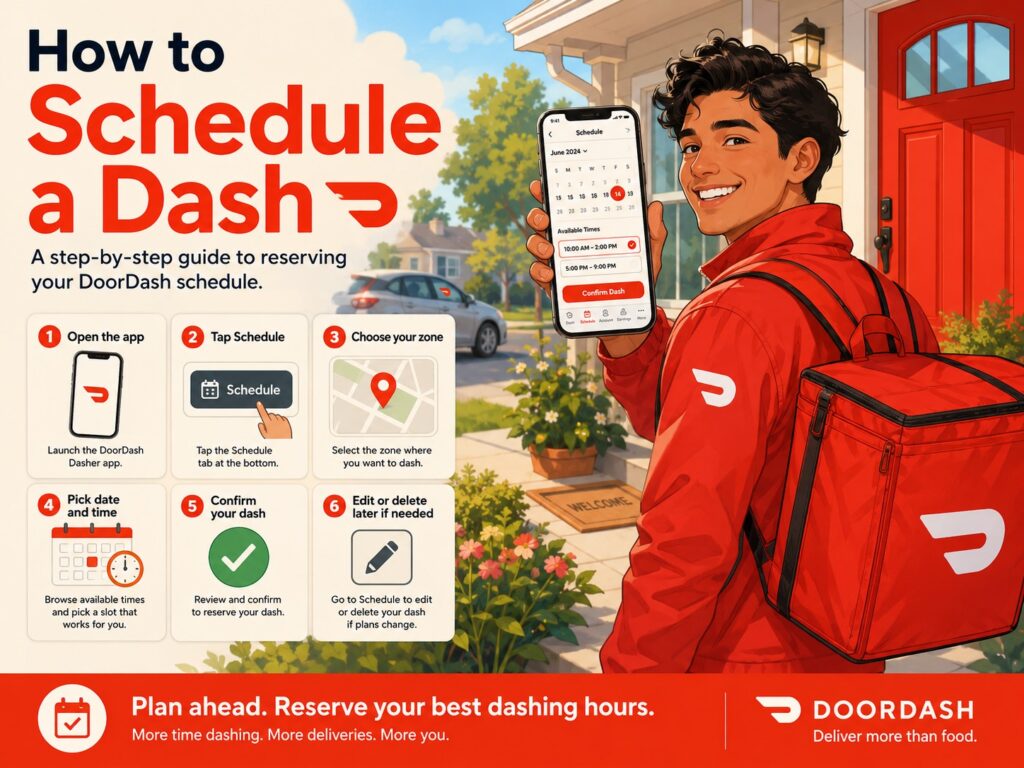
To schedule a DoorDash shift:
- Open the Dasher app.
- Go to Schedule.
- Open the Available tab.
- Select the day you want to work.
- Choose your starting zone.
- Select an available time period.
- Adjust your preferred start and end times if the slot allows it.
- Tap Save Dash.
DoorDash confirms that scheduled dashes are managed directly through the app. Support cannot manually add, edit or extend a dash for you.
What Does Scheduling a Dash Mean?
Scheduling tells DoorDash:
I plan to be available in this zone during this period.
For example:
Zone: Downtown
Date: Friday
Scheduled Dash: 5:00 p.m. to 9:00 p.m.
You have now reserved access to dash in that zone during the scheduled period.
This is especially useful when DoorDash limits how many drivers can work at one time.
If you do not schedule and the area already has enough Dashers, you may open the app later and find:
Dash Now unavailable
even though you wanted to work.
DoorDash says that when a preferred scheduling period is unavailable, scheduled Dasher capacity for that time has generally already been reached.
How to Schedule a DoorDash Shift Step by Step
Here is the current official scheduling process.
Step 1: Open the Dasher App
Log in normally.
Make sure your account is active.
If you are a brand-new Dasher who has not yet received confirmation that your account is activated, DoorDash says some app features can remain limited until the signup and activation process is complete.
Step 2: Tap Schedule
Open the Schedule tab in the Dasher app.
DoorDash’s app overview describes this section as the place where you can:
- Schedule future dashes
- View dashes you already scheduled
Depending on the current version of the app, you may also see a Schedule option from the home screen when Dash Now is unavailable.
Step 3: Open the Available Tab
At the top of the Schedule screen, DoorDash displays upcoming days.
Choose the day you want to work.
For example:
- Today
- Tomorrow
- Thursday
- Friday
- Saturday
The number of days visible can depend on your market, Rewards status and current scheduling system.
Step 4: Choose Your Starting Point
DoorDash divides cities into delivery zones.
You may see options such as:
- Downtown
- Northside
- Eastside
- Airport area
- Suburban zone
Select the starting area where you want to dash.
DoorDash says you can choose both the starting point and an available time for your dash.
Step 5: Select an Available Time
DoorDash will show the time periods that still have capacity.
For example:
11:00 a.m. to 2:30 p.m.
or:
4:00 p.m. to 10:00 p.m.
Tap a slot.
If DoorDash allows it, you can choose your own start and end time within the available window.
For example, if DoorDash shows:
4:00 p.m. to 10:00 p.m.
you might schedule:
5:00 p.m. to 8:30 p.m.
instead of working the entire six-hour period.
Step 6: Tap Save Dash
Once everything looks correct, tap:
Save Dash
DoorDash then adds the shift to your schedule.
You should now see it under your scheduled dashes.
Example DoorDash Schedule
Suppose you want to work Friday dinner.
You open the app several days ahead and find:
Friday
Available:
- 3:30 p.m. to 5:00 p.m.
- 4:00 p.m. to 11:30 p.m.
- 8:00 p.m. to midnight
You want the main dinner rush.
You choose:
4:00 p.m. to 11:30 p.m.
Then adjust it to:
5:00 p.m. to 9:00 p.m.
Save it.
Now you have reserved the four hours you actually plan to work.
How Far in Advance Can You Schedule DoorDash?
This depends on your account and market.
DoorDash’s current new-Dasher guidance says drivers can commonly schedule up to five days in advance to reserve popular lunch and dinner periods.
However, qualifying drivers with the Advanced Scheduling Dasher Rewards benefit can currently schedule up to:
6 days in advance
with the new scheduling day becoming available beginning at:
3:00 p.m. each day
That extra day can make a major difference in markets where dinner schedules disappear quickly.
Because DoorDash is testing different scheduling systems, the exact scheduling window shown in your Dasher app is the one that matters for your account.
What Is DoorDash Advanced Scheduling?
Advanced Scheduling is a Dasher Rewards benefit available to qualifying drivers in participating markets.
DoorDash currently says eligible Dashers can schedule:
Up to six days in advance
starting at:
3 p.m. each day.
This gives qualifying Dashers earlier access to future time slots.
Why Advanced Scheduling Matters
Imagine the best shift in your city is:
Friday 5 p.m. to 9 p.m.
By the time normal scheduling opens, those spots may already be heavily booked.
A Dasher with Advanced Scheduling may have had access earlier.
That can make the benefit valuable even if you do not care much about some of the other Rewards perks.
Which Dasher Rewards Tier Gets Advanced Scheduling?
DoorDash’s general Rewards page says Advanced Scheduling is one of the benefits available through the Rewards program, but the exact tier requirements depend on your area.
That means you should not assume:
Gold always gets Advanced Scheduling.
or:
You must always be Platinum.
Instead:
- Open the Dasher app.
- Go to Ratings.
- Review your Silver, Gold and Platinum benefits.
- Find Advanced Scheduling.
DoorDash says Rewards requirements and benefits vary by market.
What Time Does the DoorDash Schedule Come Out?
For Dashers with the standard Advanced Scheduling benefit, DoorDash currently says scheduling can open beginning at:
3:00 p.m.
for the day that becomes available six days ahead.
So if your market is highly competitive, checking your schedule around 3 p.m. can be worthwhile.
Do not assume every schedule will remain available until evening.
Popular blocks may disappear quickly.
DoorDash Scheduling in New York City Is Different
New York City has special scheduling rules.
As of August 2026, DoorDash says NYC Rewards status affects how far ahead you can schedule:
| NYC Dasher Status | How Far Ahead You Can Schedule |
|---|---|
| Platinum | Up to 6 days |
| Gold | Up to 3 days |
| New Dasher | Up to 3 days |
| Silver | Up to 2 days |
| No Rewards tier | Up to 1 day |
New NYC schedule slots generally become available around 3:00 p.m. ET for the newly opened day. DoorDash also says additional shifts can appear later because scheduling inventory may be released in stages.
These NYC rules should not be treated as nationwide requirements.
What Is Dash Now?
Dash Now lets you begin working without a previously scheduled shift.
When DoorDash determines that your area currently has room for more Dashers, the app can display:
Dash Now
Tap it and you can start a dash immediately.
DoorDash’s heatmap updates in real time.
The current official explanation is roughly:
- Gray: Dash Now unavailable
- Light pink: Dash Now available
- Red / Busy / Very Busy: higher customer demand and Dash Now available
Schedule vs. Dash Now
The difference is simple.
Schedule
You reserve future platform access.
Example:
I want to dash Friday from 5 p.m. to 9 p.m.
Dash Now
You start immediately because DoorDash currently has capacity for another driver.
Example:
It is 6:15 p.m., the area is busy, and I want to start right now.
Both can work.
But scheduling is much safer if you know exactly when you want to work.
Does Dash Now Mean DoorDash Is Busy?
Often, but not always in exactly the way Dashers think.
DoorDash says its heatmap uses real-time data to indicate where Dash Now is available. Red areas marked Busy or Very Busy indicate higher customer demand.
However, being allowed to Dash Now does not guarantee:
- Constant offers
- High-paying offers
- No waiting
- A profitable shift
You still have to consider:
- Customer demand
- Number of Dashers online
- Your location
- Rewards priority
- Offer eligibility
Scheduling or Dash Now gives you access to the platform, not guaranteed earnings.
Why Does My DoorDash App Say Schedule Instead of Dash Now?
If your zone is gray and Dash Now is unavailable, DoorDash may show:
Schedule
instead.
That generally means DoorDash does not currently need another unrestricted Dasher in that zone.
DoorDash says Dash Now can sometimes also be limited based on factors such as:
- Equipment type
- Vehicle type
- Rewards status
- Priority Access
- Other eligibility factors
Your options are usually:
- Wait and check again later
- Schedule a future shift
- Try another nearby zone
- Use Dash Along the Way when eligible
Why Can’t I Schedule a DoorDash Shift?
This is one of the most common scheduling problems.
You open Schedule.
The day you want is there.
But your preferred time does not appear.
DoorDash’s explanation is straightforward:
Scheduled Dasher capacity for that area and time has already been reached.
That means other Dashers may already have reserved enough spots.
It does not necessarily mean:
- Your account is broken
- DoorDash banned you from scheduling
- Your Acceptance Rate is secretly blocking every shift
The slot may simply be full.
What Should You Do When No DoorDash Schedule Is Available?
Try these strategies.
1. Check Again Later
DoorDash says its schedule updates constantly and additional time slots may become available.
Someone may:
- Delete a scheduled dash
- Shorten a shift
- Change their schedule
DoorDash may also adjust capacity.
A time that was unavailable at noon could appear later.
2. Check at the Scheduling Release Time
If you have Advanced Scheduling, check around the 3 p.m. opening time for the newly available day.
In competitive markets, even waiting until several hours later can make a difference.
3. Try a Nearby Starting Zone
DoorDash specifically recommends choosing another starting point if your preferred zone is full.
For example:
Downtown
No dinner availability.
Eastside
5 p.m. to 9 p.m. available.
If Eastside is close enough and profitable, it may be a reasonable alternative.
4. Look for Partial Shifts
Suppose you want:
5 p.m. to 9 p.m.
but it is unavailable.
You might find:
5 p.m. to 6:30 p.m.
and:
7:30 p.m. to 9 p.m.
It is not perfect, but it may be better than having no schedule at all.
5. Check Dash Now at the Time You Want to Work
Even if you failed to schedule, demand can increase later.
DoorDash says you can sign into the app and use Dash Now whenever it becomes available.
Why Did a DoorDash Time Slot Suddenly Appear?
Because schedules are not static.
DoorDash says scheduling availability updates continuously.
Several things can create new capacity.
For example:
- A Dasher deletes their schedule.
- DoorDash forecasts more demand.
- More orders begin arriving.
- Existing scheduled drivers cancel.
- DoorDash opens another block.
This is why checking repeatedly can sometimes work.
Can DoorDash Support Add Me to the Schedule?
No.
DoorDash explicitly says Support cannot:
- Add a scheduled dash
- Edit a scheduled dash
- Extend your dash
Scheduling is controlled through the Dasher app and updates in real time.
So calling Support and saying:
Can you schedule me for Friday at 6 p.m.?
generally will not solve the problem.
If the time slot is full, Support cannot manually create capacity for you.
How to Edit a Scheduled DoorDash Shift
Plans change.
Maybe you scheduled:
5 p.m. to 10 p.m.
but now you need to stop at:
8 p.m.
DoorDash currently allows you to edit eligible scheduled shifts directly in the app.
The official process is:
- Open Schedule.
- Select the scheduled day.
- Open the Scheduled tab.
- Tap the scheduled dash.
- Tap the start or end time.
- Select the new time.
- Tap Done.
- Tap Save Dash.
Can You Extend a Scheduled DoorDash Shift?
You may be able to extend a dash when DoorDash has additional capacity.
The Dasher app includes an Extend option during active dashes, but availability depends on whether the platform still has room for more Dashers during the later period.
If the time immediately after your scheduled shift is already full, DoorDash may not allow the extension.
For example:
Scheduled:
5 p.m. to 8 p.m.
You want:
5 p.m. to 10 p.m.
If the 8 p.m. to 10 p.m. capacity is already filled, the app may reject the extension.
Why Can’t I Extend My Dash?
The most common reason is capacity.
DoorDash controls how many Dashers are scheduled for particular periods.
If enough Dashers are already expected to be online after your scheduled end time, no extension may be offered.
There is also an important scheduling restriction:
DoorDash says that if you already have another scheduled dash, you cannot schedule a new dash or extend the current one within 30 minutes of the next scheduled dash’s start time.
That rule gives you time to travel to the area where your next scheduled dash begins.
Example of the 30-Minute Rule
Suppose:
Current dash
2:00 p.m. to 4:30 p.m.
Next scheduled dash
5:00 p.m. in another zone.
You may not be allowed to extend the first dash into that 30-minute period before the next scheduled shift.
DoorDash wants you to have time to reach your next starting zone.
How to Delete a Scheduled DoorDash Shift
If you know you will not work the shift, you can delete it.
DoorDash’s process is:
- Open Schedule.
- Choose the scheduled day.
- Open Scheduled.
- Tap the dash you want to remove.
- Tap Delete in the upper-right corner.
Deleting it can also free capacity that another Dasher may later see as an available slot.
Should You Delete a Dash You Cannot Work?
Yes, if you know you will not be using it.
There is little value in keeping a schedule you have no intention of working.
It also keeps your own schedule organized.
Can You Shorten a DoorDash Shift?
Yes, when the available scheduling window permits the edit.
DoorDash allows you to adjust the scheduled start and end times from the Scheduled tab.
For example:
Original:
4:00 p.m. to 10:00 p.m.
Change to:
5:30 p.m. to 8:30 p.m.
Save it.
Can You Split a DoorDash Schedule Into Multiple Shifts?
Often, yes, provided the individual time slots are available.
For example, rather than scheduling:
11 a.m. to 9 p.m.
you might schedule:
Lunch
11 a.m. to 2 p.m.
Dinner
5 p.m. to 9 p.m.
This can be a better strategy because it avoids wasting hours sitting through the slow period between lunch and dinner.
It also gives you time to:
- Eat
- Refuel
- Rest
- Run errands
- Charge your phone
My Preferred DoorDash Scheduling Strategy
I prefer scheduling around demand, not simply reserving the longest block available.
For example:
Lunch
11:00 a.m. to 2:00 p.m.
Dinner
4:30 or 5:00 p.m. to 9:00 p.m.
DoorDash’s current new-Dasher guide identifies lunch around 11 a.m. to 2 p.m. and dinner around 4:30 p.m. to 8 p.m. as periods that are often busiest.
Your market may peak earlier or later.
The point is to reserve the hours where customers actually order.
Do Not Schedule Eight Hours Just Because You Can
Suppose you see:
10 a.m. to 10 p.m.
available.
That does not mean you should automatically reserve twelve hours.
Your market may actually behave like:
10–11 a.m.
Slow
11 a.m.–2 p.m.
Busy
2–4:30 p.m.
Slow
4:30–9 p.m.
Busy
9–10 p.m.
Moderate
A targeted schedule may produce almost the same revenue while using much less of your time.
Sample Part-Time DoorDash Schedule
For someone working after a regular job:
Monday
5:00 p.m. to 8:00 p.m.
Wednesday
5:00 p.m. to 8:00 p.m.
Friday
5:00 p.m. to 9:30 p.m.
Saturday
5:00 p.m. to 10:00 p.m.
This focuses heavily on dinner demand.
Sample Weekend DoorDash Schedule
Friday
5:00 p.m. to 10:00 p.m.
Saturday
11:00 a.m. to 2:00 p.m.
5:00 p.m. to 10:00 p.m.
Sunday
10:30 a.m. to 2:00 p.m.
4:30 p.m. to 8:30 p.m.
This gives you exposure to:
- Weekend lunch
- Brunch
- Dinner
- Friday/Saturday evening demand
Sample Full-Time DoorDash Schedule
A full-time driver does not necessarily need to dash continuously for ten hours.
You could structure it as:
Lunch
10:30 a.m. to 2:30 p.m.
Break
2:30 p.m. to 4:30 p.m.
Dinner
4:30 p.m. to 9:00 p.m.
That gives you:
8.5 scheduled hours
but avoids some of the weakest afternoon period.
Your exact schedule should come from your own earnings history.
Schedule Your Best Hours First
If you know Friday and Saturday dinner are your highest-earning shifts, book those before worrying about Tuesday afternoon.
Prioritize:
- Most profitable days
- Strongest time periods
- Best zones
Scheduling is valuable because it lets you protect the periods you care about most.
Should You Schedule Every Day?
Not necessarily.
Schedule the periods you realistically expect to work.
A better system might be:
- Reserve your core profitable shifts.
- Use Dash Now for additional spontaneous hours.
- Add extra shifts when promotions or weather create unexpected demand.
This gives you structure without locking yourself into an unrealistic weekly plan.
Can You Schedule in Another DoorDash Zone?
Yes, when the zone appears in your scheduling options and has availability.
DoorDash allows drivers to choose a starting point when scheduling.
This can be useful if you live between several zones.
For example:
Zone A
Better lunch.
Zone B
Better dinner.
You might schedule:
11 a.m.–2 p.m. in Zone A
then:
5 p.m.–9 p.m. in Zone B.
What Is Dash Along the Way?
Dash Along the Way can help when your planned dash starts in a different nearby zone.
DoorDash says you can select a zone you are traveling toward and, when eligible, use Dash Along the Way to receive offers that move you generally toward that starting area.
DoorDash currently says the destination zone needs to be within approximately a one-hour commute for the feature to be available.
This can make the drive toward another zone more productive.
Example of Dash Along the Way
You live in:
Zone A
but scheduled dinner in:
Zone B
which is 20 minutes away.
Instead of driving those 20 minutes without earning anything, the app may offer:
Dash Along the Way
You could receive an order that takes you in the general direction of Zone B.
That can reduce unpaid commuting mileage.
Can DoorDash Send You to Another Zone During a Dash?
Yes.
A customer destination may take you outside your starting zone.
DoorDash also has zone-switching features in some markets that may let you continue in the new busy zone rather than returning immediately.
However, if your schedule is tied to a particular area, think carefully before ending the original dash.
If you end it, you may not be able to restart there immediately if capacity is full.
Should You End a Scheduled Dash to Switch Zones?
Be careful.
Suppose you scheduled:
Zone A, 5 p.m.–9 p.m.
At 6 p.m., a delivery takes you to Zone B.
You end your original dash because Zone B looks red.
Then Zone B suddenly goes gray.
Zone A is also full.
You may have just lost your guaranteed scheduled access.
When the app provides an official Switch Zone option, use that rather than ending blindly when possible.
DoorDash Schedule Not Showing: What to Check
Sometimes you know you scheduled a dash, but it appears to be missing.
First:
- Open Schedule.
- Choose the correct date.
- Open Scheduled.
- Confirm the correct starting zone.
- Refresh the app.
If it still does not appear, standard Dasher app troubleshooting can include:
- Updating the app
- Force-closing and reopening
- Restarting the phone
- Checking network connectivity
If the schedule disappears during a broader DoorDash outage, DoorDash lists involuntary removal from a current or scheduled dash as one possible outage symptom.
DoorDash Schedule Disappeared During an Outage
When DoorDash experiences a platform outage, you may see problems such as:
- Unable to log in
- Unable to start a dash
- Unable to end a dash
- Pause not working
- Scheduled dash disappearing
- Completed order missing
- App crashes
DoorDash’s current outage guidance says that during a confirmed outage you should:
- Refresh the app
- Keep trying to log in
and specifically avoid resetting your password or uninstalling/reinstalling the app while the outage is active.
That is different from normal troubleshooting when the platform itself is working.
DoorDash Schedule Is Empty
An empty schedule usually means there are currently no open shifts matching the selected:
- Day
- Area
- Time
DoorDash says this generally means enough Dashers are already scheduled.
Try:
- Checking later
- Selecting another day
- Selecting another zone
- Checking when new schedules release
- Using Dash Now if demand later increases
Why Can My Friend Schedule but I Can’t?
There can be several reasons.
Your friend may have:
- Advanced Scheduling
- A different Rewards tier
- A different starting zone
- Access to a pilot scheduling system
- Different vehicle/equipment eligibility
DoorDash’s current app and Rewards systems can vary by Dasher and market.
So two drivers in the same general city may not always see identical options.
Does Acceptance Rate Affect DoorDash Scheduling?
It can indirectly matter through Dasher Rewards.
DoorDash says Rewards qualification requirements can include Acceptance Rate, Completion Rate and Customer Rating, and Advanced Scheduling can be one of the benefits available through those Rewards tiers.
That means the relationship can look like:
Acceptance Rate affects Rewards qualification → Rewards status affects Advanced Scheduling
depending on your market.
This is different from saying:
DoorDash has one nationwide Acceptance Rate required to schedule.
DoorDash says Rewards requirements vary by area.
Does Platinum Let You Schedule Earlier?
It can, depending on your market.
DoorDash’s Rewards system can provide Advanced Scheduling, and in NYC the difference is explicit: Platinum Dashers can currently schedule up to six days ahead, while lower tiers have shorter booking windows.
Check the benefits shown in your Ratings tab.
What Is Different in the Overall Dasher Rating Pilot?
DoorDash’s newer Overall Dasher Rating, or ODR, changes the importance of scheduling in participating markets.
DoorDash currently says Dashers who are part of the ODR pilot can go online without needing to schedule ahead merely to guarantee access to the platform.
In these markets, the Schedule tab can instead show suggested busy times rather than the complete traditional list of available scheduling periods.
That is a major change.
Traditional market:
Schedule to reserve a spot.
ODR pilot:
You may be able to go online without reserving a spot, while the schedule becomes more useful for showing predicted demand.
Does ODR Mean You Should Ignore Scheduling Completely?
Not necessarily.
Even when you can go online at any time, you still want to know when demand is likely to be strongest.
If DoorDash shows:
Suggested busy time: 5 p.m.–8 p.m.
that information can help you decide when the platform is likely to be more productive.
Being able to go online does not guarantee orders.
Scheduling Does Not Guarantee DoorDash Orders
This point deserves its own section.
A scheduled dash means:
You have reserved access to dash.
It does not mean:
DoorDash guarantees customers will order.
You can schedule:
2 p.m. to 4 p.m.
and still spend significant time waiting if customer demand is weak.
This is why scheduling the right hours matters just as much as securing the schedule itself.
Best Time to Schedule DoorDash
There are two ways to interpret this question.
Best Time to Open the Schedule
For drivers with DoorDash Advanced Scheduling, check around:
3 p.m.
when the new day becomes available six days ahead.
Best Hours to Actually Dash
DoorDash identifies lunch and dinner as common peak periods, with current new-Dasher guidance pointing to approximately:
Lunch: 11 a.m.–2 p.m.
Dinner: 4:30 p.m.–8 p.m.
Your own market may extend dinner to:
- 9 p.m.
- 10 p.m.
- Later on weekends
Track your results.
How to Get Better DoorDash Schedule Slots
Here is the strategy I recommend.
1. Learn When Your Scheduling Window Opens
Do not wait until the night before if your market fills days ahead.
2. Check Around 3 p.m. if You Have Advanced Scheduling
DoorDash currently releases Advanced Scheduling access beginning at that time.
3. Book Friday and Saturday Early
These are often attractive shifts for many drivers.
Reserve them before worrying about weaker periods.
4. Schedule Lunch and Dinner Separately
Avoid unnecessary slow hours.
5. Check Nearby Zones
One zone may fill faster than another.
6. Recheck Sold-Out Periods
DoorDash says availability can reopen.
7. Keep Your Rewards Status in Mind
If Advanced Scheduling is valuable in your market, include that benefit when deciding whether maintaining a particular Rewards tier is worth it.
Should You Schedule a Dash Even if Dash Now Is Usually Available?
I generally would when you already know you want to work a specific period.
Why take the risk?
You may usually see Dash Now at:
6 p.m. Friday
but one particular Friday could have far more Dashers online.
Scheduling ahead gives you more certainty.
Use spontaneous Dash Now access as a bonus rather than your entire strategy in competitive markets.
Can You Schedule DoorDash and Decide Not to Work?
DoorDash allows you to edit or delete scheduled dashes through the app.
If you know you will not work, remove the shift.
Do not build a habit of reserving every possible block and then deciding later which ones you feel like using.
A cleaner schedule makes your own planning easier.
Can You Schedule Multiple DoorDash Dashes in One Day?
Yes, when the time slots are available and do not create scheduling conflicts.
For example:
Dash 1
11:00 a.m.–2:00 p.m.
Dash 2
5:00 p.m.–9:00 p.m.
This is one of my favorite scheduling structures because it targets the two strongest meal periods without forcing you to remain online all afternoon.
DoorDash’s rule about nearby scheduled dashes is important, though: a scheduled dash beginning within 30 minutes can prevent you from creating or extending another dash into that period.
Can DoorDash Automatically End Your Dash at the Scheduled Time?
Your scheduled end time defines the planned shift.
If additional capacity is available, you may be offered the option to extend using the active-dash menu.
Do not assume you will always be able to keep working past your scheduled end.
If you absolutely want to work until 10 p.m., try to reserve that time ahead rather than scheduling until 8 p.m. and hoping DoorDash lets you extend later.
Schedule Longer or Shorter?
I prefer giving myself enough room around the profitable period.
For example, if dinner is usually:
5 p.m.–8:30 p.m.
I might schedule:
4:30 p.m.–9 p.m.
That gives me flexibility.
If demand dies early, I can end.
If demand remains strong, I already have access.
What I would avoid is scheduling:
5 p.m.–7 p.m.
when I already know I might want to work until 9.
The later slot could be full when I try to extend.
DoorDash Scheduling and Peak Pay
Scheduling a dash does not automatically guarantee a promotion.
Peak Pay is a separate incentive that DoorDash can offer based on:
- Time
- Area
- Demand
DoorDash’s current Peak Pay rules also depend partly on the zone where your dash began.
So if you schedule a popular period because you expect Peak Pay, always check the actual promotion details in the app.
Do not assume last Friday’s promotion will repeat this Friday.
Should You Schedule Based on Peak Pay?
Be careful.
Peak Pay attracts drivers.
Suppose DoorDash announces:
+$3 per offer from 5 p.m. to 9 p.m.
Many Dashers may schedule or drive to that zone.
Customer demand may increase, but so can Dasher supply.
The promotion is nice, but the best schedule is still the one that produces strong:
- Earnings per hour
- Earnings per mile
- Offer frequency
Do not chase promotions blindly.
Scheduling for Shop and Deliver
If you like Shop and Deliver, afternoon periods that are weaker for restaurant delivery can sometimes provide shopping opportunities.
DoorDash matches orders partly according to:
- Equipment
- Preferences
- Eligibility
so your individual offer mix can differ from another Dasher’s.
Track whether your market gives you enough grocery or retail orders to make those hours worth scheduling.
Special Scheduled Catering Offers Are Different
Some selected Platinum Dashers can participate in DoorDash’s newer Catering Claim Ahead program.
This is not the same thing as scheduling an ordinary dash.
DoorDash says eligible Dashers can view and claim certain catering offers in advance, with offers potentially appearing up to seven days ahead. Claimed catering offers then appear in the schedule.
For these special offers, DoorDash provides specific:
- Check-in times
- Arrive-by times
- Delivery times
and requires the driver to confirm availability before the scheduled catering pickup.
Only selected Dashers have access, so do not confuse this with normal Schedule-a-Dash functionality.
Common DoorDash Scheduling Mistakes
1. Waiting Until the Day You Want to Work
Good shifts may already be full.
2. Assuming Dash Now Will Always Be Available
It may disappear when Dasher capacity is reached.
3. Scheduling the Whole Day
Focus on profitable hours instead.
4. Ignoring Advanced Scheduling
If your Rewards tier gives it to you, use it.
5. Calling Support to Add a Shift
DoorDash says Support cannot add, edit or extend your schedule.
6. Ending a Good Scheduled Dash Too Early
You may not be able to restart immediately if the zone becomes full.
7. Depending on Extensions
Reserve the full period you realistically expect to work.
8. Forgetting About the Next Scheduled Dash
DoorDash restricts scheduling or extension within 30 minutes of a later scheduled start.
9. Chasing a Red Zone After Losing Your Scheduled Spot
The new zone may become unavailable before you arrive.
10. Assuming a Schedule Guarantees Orders
It guarantees access, not demand.
DoorDash Scheduling Troubleshooting Checklist
If scheduling is not working:
No available slots
- Check later
- Try another zone
- Check around your schedule-release time
Schedule disappeared
- Refresh the app
- Check the correct date
- Check Scheduled tab
- Restart app
- Check for outages
Cannot extend
- Capacity may be full
- Check whether another dash starts within 30 minutes
Dash Now missing
- Area may be gray/full
- Check another zone
- Wait for demand to increase
Brand-new account cannot schedule properly
- Verify account activation
- Complete required signup steps
DoorDash’s official troubleshooting pages confirm that availability, account activation and scheduled capacity are common reasons these features may not appear.
Frequently Asked Questions
How do you schedule a DoorDash shift?
Open the Dasher app, tap Schedule, select an available day, choose your starting point and time, adjust your preferred start/end times, and tap Save Dash.
How far in advance can you schedule DoorDash?
DoorDash’s general new-Dasher guidance says schedules can commonly be booked up to five days in advance, while qualifying Dasher Rewards members with Advanced Scheduling can currently schedule up to six days ahead.
Actual scheduling windows can vary by market.
What time does DoorDash scheduling open?
For the general Advanced Scheduling benefit, DoorDash currently says the newly available day opens beginning at 3 p.m. each day.
Is DoorDash scheduling different in NYC?
Yes.
DoorDash currently says NYC scheduling windows depend on Rewards tier, ranging from one day ahead for non-tier Dashers up to six days for Platinum. New shifts generally appear around 3 p.m. ET.
Why can’t I schedule DoorDash?
DoorDash says that if your preferred location and time are not shown, scheduled Dasher capacity has generally already been reached. Check again later or choose another starting point.
Why did the DoorDash schedule disappear so fast?
Available slots can be claimed by other Dashers as scheduling capacity fills.
DoorDash schedules update in real time.
Can more DoorDash shifts appear later?
Yes.
DoorDash specifically recommends checking back because additional time slots can open later.
Can DoorDash Support schedule me?
No.
DoorDash says Support cannot add, edit or extend a dash. Scheduling must be handled through the app.
Can I edit my DoorDash schedule?
Yes.
Open Schedule, select the day, go to Scheduled, select the dash, change the start/end time and save it.
Can I delete a scheduled Dash?
Yes.
Open the scheduled dash and tap Delete.
Can I extend my DoorDash shift?
You may be able to extend from the active-dash options when additional scheduling capacity exists.
Why can’t I extend my Dash?
The later period may already have enough Dashers. You also cannot schedule or extend into the 30-minute period before another scheduled dash begins.
What is Dash Now?
Dash Now allows you to start dashing immediately when DoorDash has capacity or when your account has applicable priority access.
Why does DoorDash say Schedule instead of Dash Now?
The zone may currently be gray, meaning Dash Now is unavailable. You may instead schedule a future shift.
What does a gray DoorDash map mean?
DoorDash currently says gray generally means Dash Now is unavailable for that area.
What does a red DoorDash zone mean?
Red areas labeled Busy or Very Busy indicate higher current customer demand and Dash Now availability.
Does a red zone guarantee orders?
No.
It indicates demand and platform availability, but it does not guarantee that one particular Dasher will receive an immediate offer.
Does scheduling guarantee orders?
No.
Scheduling reserves your ability to dash during a time period. Actual offer volume still depends on customer demand and other matching factors.
Does Acceptance Rate affect scheduling?
It can indirectly affect scheduling when Acceptance Rate contributes to the Rewards tier that provides Advanced Scheduling. DoorDash says Rewards requirements vary by area.
Does Platinum let you schedule six days ahead?
In markets where Platinum includes the applicable Advanced Scheduling benefit, it can. NYC explicitly allows Platinum Dashers to schedule up to six days ahead.
Do new Dashers get scheduling benefits?
DoorDash’s current guidance gives new drivers introductory benefits during their first 50 deliveries in its Rewards system, while general new-Dasher scheduling guidance says shifts can commonly be reserved up to five days ahead.
Can I schedule two dashes in one day?
Yes, when available slots do not conflict.
For example, you can schedule separate lunch and dinner shifts.
Can I schedule in another DoorDash zone?
Yes, if that starting point appears in your Schedule tab and has available capacity.
What is Dash Along the Way?
It is a DoorDash feature that can let you receive deliveries while traveling toward another nearby zone you plan to dash in.
Can I lose my scheduled spot if I end my Dash?
If you end the dash, starting again depends on current platform availability. If the zone becomes full, Dash Now may no longer be available.
Why does my DoorDash schedule not show after I saved it?
Check:
- Correct date
- Scheduled tab
- Correct zone
- Network connection
- App version
If needed, refresh or restart the Dasher app using DoorDash’s standard troubleshooting steps.
Can a DoorDash outage remove my scheduled dash?
DoorDash lists being involuntarily removed from a current or scheduled dash as one possible symptom of a Dasher app outage.
Should I reinstall the Dasher app if my schedule disappears?
During normal technical troubleshooting, reinstalling can be one option after simpler fixes fail. During a known DoorDash-wide outage, however, DoorDash specifically advises against uninstalling and reinstalling until the outage is resolved.
What is the best DoorDash schedule for making money?
There is no universal schedule, but DoorDash currently identifies lunch around 11 a.m.–2 p.m. and dinner around 4:30–8 p.m. as commonly busy periods.
Track your market to identify the exact days and hours that produce the best earnings.
Final Thoughts
Scheduling is one of the simplest ways to make DoorDash more predictable.
Instead of opening the app at 6 p.m. and hoping your zone lets you work, you can reserve the hours you actually want in advance.
The basic process is easy:
Schedule → Available → Day → Zone → Time → Save Dash.
The harder part is getting the best slots before other Dashers take them.
If your market is competitive:
- Check the schedule regularly.
- Use Advanced Scheduling when available.
- Check around the current 3 p.m. release time if that benefit applies to you.
- Reserve lunch and dinner early.
- Try nearby zones when your preferred zone is full.
- Recheck unavailable periods because new openings can appear.
And remember that scheduling and earnings are not the same thing.
A six-hour scheduled shift is useless if four of those hours are dead.
After more than five years of dashing, I would rather have a focused schedule covering the strongest parts of lunch and dinner than stay online all day simply because DoorDash gave me the option.
Use your own earnings history to identify:
- Best days
- Best hours
- Best zones
- Slow periods
- Restaurant clusters
Then schedule around those patterns.
DoorDash scheduling should give you access to the hours you want.
Your strategy determines whether those hours actually become profitable.